04service
本文最后更新于 2021-08-05 11:42:59
service
service 保存路径
/usr/lib/systemd/system/etc/systemd/system
命令
- 开机自启动
systemctl enable xxx.service禁止开机自启动
systemctl disable xxx.service查看服务状态
systemctl status xxx.service启动服务
systemctl start xxx.service停止服务
systemctl stop xxx.service重启服务
systemctl restart xxx.service查看已启动的服务
systemctl list-units --type=service
Demo
# /usr/lib/systemd/system/sample.service
[Unit]
Description=Description for sample script goes here
After=network.target

[Service]
Type=simple
ExecStart=/var/tmp/test_script.sh
TimeoutStartSec=0

[Install]
WantedBy=multi-user.target
参数
Unit
- Description:描述服务
- After:代表要在其他的某些程序完成之后再执行
Service
- Type:代表执行顺序和方式.
- Type=simple(默认值): systemd认为该服务将立即启动. 服务进程不会fork. 如果该服务要启动其 他服务, 不要使用此类型启动, 除非该服务是socket激活型.
- Type=forking: systemd认为当该服务进程fork, 且父进程退出后服务启动成功。对于常规的守护进程(daemon),除非你确定此启动方式无法满足需求, 使用此类型启动即可.使用此启动类型应同时指定 PIDFile=, 以便systemd能够跟踪服务的主进程.
- Type=oneshot: 这一选项适用于只执行一项任务、随后立即退出的服务. 可能需要同时设置 RemainAfterExit=yes 使得 systemd 在服务进程退出之后仍然认为服务处于激活状态.
- Type=notify: 与 Type=simple 相同,但约定服务会在就绪后向 systemd 发送一个信号. 这一通知的实现由 libsystemd-daemon.so 提供.
- Type=dbus: 若以此方式启动, 当指定的 BusName 出现在DBus系统总线上时, systemd认为服务就绪.
- Type=idle: 服务会延迟启动, 一直到其他服务都启动完成之后才会启动此服务.
- ExecStart:为服务的具体运行命令
- ExecReload:为重启命令
- ExecStop:为停止命令
Install
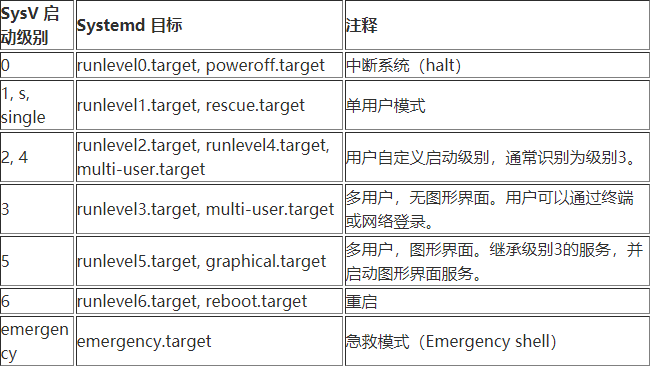
- WantedBy:类似而又不同于启动级别(runlevel)的概念.
docker.service
[Unit]
Description=Docker Application Container Engine
Documentation=https://docs.docker.com
BindsTo=containerd.service
After=network-online.target firewalld.service containerd.service
Wants=network-online.target
Requires=docker.socket

[Service]
Type=notify
# the default is not to use systemd for cgroups because the delegate issues still
# exists and systemd currently does not support the cgroup feature set required
# for containers run by docker
ExecStart=/usr/bin/dockerd -H fd:// --containerd=/run/containerd/containerd.sock
ExecReload=/bin/kill -s HUP $MAINPID
TimeoutSec=0
RestartSec=2
Restart=always

# Note that StartLimit* options were moved from "Service" to "Unit" in systemd 229.
# Both the old, and new location are accepted by systemd 229 and up, so using the old location
# to make them work for either version of systemd.
StartLimitBurst=3

# Note that StartLimitInterval was renamed to StartLimitIntervalSec in systemd 230.
# Both the old, and new name are accepted by systemd 230 and up, so using the old name to make
# this option work for either version of systemd.
StartLimitInterval=60s

# Having non-zero Limit*s causes performance problems due to accounting overhead
# in the kernel. We recommend using cgroups to do container-local accounting.
LimitNOFILE=infinity
LimitNPROC=infinity
LimitCORE=infinity

# Comment TasksMax if your systemd version does not support it.
# Only systemd 226 and above support this option.
TasksMax=infinity

# set delegate yes so that systemd does not reset the cgroups of docker containers
Delegate=yes

# kill only the docker process, not all processes in the cgroup
KillMode=process

[Install]
WantedBy=multi-user.target
04service
https://jiajun.xyz/2020/10/10/linux/04service/