04Hystrix
Hystrix
在分布式系统中,难免有对外部接口的依赖,而外部接口有可能出现响应缓慢,大量请求超时,大量访问出现异常等情况。出现上面所说的情况有可能是由很多原因导制的,可能是网络抖动,外部系统有没有测出的bug等。因为一个接口的异常,有可能导制线程阻塞,影响到其它接口的服务,甚至整个系统的服务给拖跨,对外部系统依赖的模块越多,出现的风险也就会越高,Hystrix正是用于解决这样的问题。
简单使用
整和spring
<dependency>
    <groupId>org.springframework.cloud</groupId>
    <artifactId>spring-cloud-starter-netflix-hystrix</artifactId>
</dependency>
//===================================================
@EnableHystrix

//====================================================
@GetMapping("/hello")
@HystrixCommand(fallbackMethod="helloFallBack")
public Object sayHello(String name) {
    //return restTemplate.getForObject("http://producer/hello?name={n}", Object.class,name);
    //等价于
    HashMap<String, String> params = new HashMap<>();
    params.put("name",name);
    return restTemplate.getForObject("http://producer/hello?name={name}", Object.class,params);
}
整和fegin
feign:
  hystrix:
    enabled: true
//=================================

@FeignClient(value = "producer" ,fallback = HelloClientFallBack.class)
//或者fallbackFactory
原生
public class HelloCommand extends HystrixCommand<String> {

    protected HelloCommand() {


        super(Setter.withGroupKey(HystrixCommandGroupKey.Factory.asKey("test"))
                .andCommandPropertiesDefaults(HystrixCommandProperties.Setter()
                        //开启熔断模式
                        .withCircuitBreakerEnabled(true)
                        //出现错误的比率超过30%就开启熔断
                        .withCircuitBreakerErrorThresholdPercentage(30)
                        //至少有10个请求才进行errorThresholdPercentage错误百分比计算
                        .withCircuitBreakerRequestVolumeThreshold(10)
                        //半开试探休眠时间,这里设置为3秒
                        .withCircuitBreakerSleepWindowInMilliseconds(3000)
                        )
                );

    }

    @Override
    protected String run() throws Exception {
        //模拟外部请求需要的时间长度
        System.out.println("执行了run方法");
        Thread.sleep(2000);
        return "sucess";
    }

    @Override
    protected String getFallback() {
      //当外部请求超时后,会执行fallback里的业务逻辑
      System.out.println("执行了回退方法");
      return "error";
    }

}


public class App {
    public static void main(String[] args) throws InterruptedException {
        for (int i = 0; i < 30; i++) {
            HelloCommand command = new HelloCommand();
            String result = command.execute();
            System.out.println("circuit Breaker is open : " + command.isCircuitBreakerOpen());
            if(command.isCircuitBreakerOpen()){
                Thread.currentThread().sleep(500);
            }
        }
    }
}
@HystrixCommand参数配置
@HystrixCommand(commandKey = "getCompanyInfoById",
                groupKey = "company-info",
                threadPoolKey = "company-info",
                fallbackMethod = "fallbackMethod",
                threadPoolProperties = {
                    @HystrixProperty(name = "coreSize", value = "30"),
                    @HystrixProperty(name = "maxQueueSize", value = "101"),
                    @HystrixProperty(name = "keepAliveTimeMinutes", value = "2"),
                    @HystrixProperty(name = "queueSizeRejectionThreshold", value = "15"),
})- commandKey: 代表一个接口, 如果不配置,默认是@HystrixCommand注解修饰的函数的函数名。
- groupKey: 代表一个服务,一个服务可能会暴露多个接口。 Hystrix会根据组来组织和统计命令的告、仪表盘等信息。Hystrix命令默认的线程划分也是根据命令组来实现。默认情况下,Hystrix会让相同组名的命令使用同一个线程池,所以我们需要在创建Hystrix命令时为其指定命令组来实现默认的线程池划分。
- threadPoolKey: 对线程池进行更细粒度的配置,默认等于groupKey的值。如果依赖服务中的某个接口耗时较长,需要单独特殊处理,最好单独用一个线程池,这时候就可以配置threadpool key。也可以多个服务接口设置同一个threadPoolKey构成线程组。
- fallbackMethod:@HystrixCommand注解修饰的函数的回调函数,@HystrixCommand修饰的函数必须和这个回调函数定义在同一个类中,因为定义在了同一个类中,所以fackback method可以是public/private均可。
- 线程池配置:coreSize表示核心线程数,hystrix默认是10;maxQueueSize表示线程池的最大队列大小; keepAliveTimeMinutes表示非核心线程空闲时最大存活时间;queueSizeRejectionThreshold:该参数用来为队列设置拒绝阈值。通过该参数,即使队列没有达到最大值也能拒绝请求。
降级
服务提前配置备用措施,当故障发生时无缝启用备用方案(或者返回一些默认值),用户无感知,最终目的都是为了提供7*24小时稳定服务,这样对用户来说才是高价值、可信赖的优质服务。
线程run()抛出异常,超时,线程池或信号量满了,或短路了,都会触发fallback机制。
| 名字 | 描述 | 触发fallback |
|---|---|---|
| EMIT | 值传递 | NO |
| SUCCESS | 执行完成,没有错误 | NO |
| FAILURE | 执行抛出异常 | YES |
| TIMEOUT | 执行开始,但没有在允许的时间内完成 | YES |
| BAD_REQUEST | 执行抛出HystrixBadRequestException | NO |
| SHORT_CIRCUITED | 断路器打开,不尝试执行 | YES |
| THREAD_POOL_REJECTED | 线程池拒绝,不尝试执行 | YES |
| SEMAPHORE_REJECTED | 信号量拒绝,不尝试执行 | YES |
熔断
当请求调用失败率达到阀值自动触发降级(如因网络故障/超时造成的失败率高),熔断器触发的快速失败会进行快速恢复。
- 如果经过断路器的流量超过了一定的阈值,HystrixCommandProperties.circuitBreakerRequestVolumeThreshold()配置,默认20。比如,要求在10s内,经过短路器的流量必须达到20个才会去判断要不要短路;
- 如果断路器统计到的异常调用的占比超过了一定的阈值,HystrixCommandProperties.circuitBreakerErrorThresholdPercentage()配置。如果达到了上面的要求,比如说在10s内,经过短路器的请求达到了30个;同时其中异常的访问数量,占到了一定的比例(**默认50%**),比如60%的请求都是异常(报错,timeout,reject),会开启短路;
- 然后断路器从close状态转换到open状态;
- 断路器打开的时候,所有经过该断路器的请求全部被短路,不调用后端服务,直接走fallback降级逻辑;
- 经过了一段时间之后,HystrixCommandProperties.circuitBreakerSleepWindowInMilliseconds()配置,断路器会half-open状态,让一条请求经过短路器,看能不能正常调用。如果调用成功了,那么断路器就自动恢复,转到close状态。
隔离策略/限流
hystrix提供了两种隔离策略:线程池隔离和信号量隔离。hystrix默认采用线程池隔离。
线程池隔离:不同服务通过使用不同线程池,彼此间将不受影响,达到隔离效果。我们通过andThreadPoolKey配置使用命名为ThreadPoolTest的线程池,实现与其他命名的线程池天然隔离,如果不配置andThreadPoolKey则使用withGroupKey配置来命名线程池
信号量隔离:线程隔离会带来线程开销,有些场景(比如无网络请求场景)可能会因为用开销换隔离得不偿失,为此hystrix提供了信号量隔离,当服务的并发数大于信号量阈值时将进入fallback。通过withExecutionIsolationStrategy(ExecutionIsolationStrategy.SEMAPHORE)配置为信号量隔离,通过withExecutionIsolationSemaphoreMaxConcurrentRequests配置执行并发数不能大于3,由于信号量隔离下无论调用哪种命令执行方法,hystrix都不会创建新线程执行run()/construct(),所以调用程序需要自己创建多个线程来模拟并发调用execute(),最后看到一旦并发线程>3,后续请求都进入fallback
请求缓存
在一次请求中,如果有多个command,参数都是一样的,调用的接口也是一样的,其实结果可以认为也是一样的。这个时候,可以让第一次command执行返回的结果,被缓存在内存中,然后在这个请求上下文中,后续的其他对这个依赖的调用全部从内存中取用缓存结果就可以了。
//使用@CacheResult实现缓存功能
@CacheResult(cacheKeyMethod = "getCacheKey")
@HystrixCommand(commandKey = "findUserById", groupKey = "UserService", threadPoolKey = "userServiceThreadPool")
public UserVO findById(Long id) {
    ResponseEntity<UserVO> user = restTemplate.getForEntity("http://users-service/user?id={id}", UserVO.class, id);
    return user.getBody();
}

public String getCacheKey(Long id) {
    return String.valueOf(id);
}

//使用@CacheResult和@CacheKey实现缓存功能
@CacheResult
@HystrixCommand(commandKey = "findUserById", groupKey = "UserService", threadPoolKey = "userServiceThreadPool")
public UserVO findById2(@CacheKey("id") Long id) {
    ResponseEntity<UserVO> user = restTemplate.getForEntity("http://users-service/user?id={id}", UserVO.class, id);
    return user.getBody();
}

//使用@CacheRemove清空缓存
@CacheRemove(commandKey = "findUserById")
@HystrixCommand(commandKey = "updateUser",groupKey = "UserService",threadPoolKey = "userServiceThreadPool")
public void updateUser(@CacheKey("id")UserVO user){
    restTemplate.postForObject("http://users-service/user",user,UserVO.class);
}
请求合并
hystrix支持N个请求自动合并为一个请求,这个功能在有网络交互的场景下尤其有用,比如每个请求都要网络访问远程资源,如果把请求合并为一个,将使多次网络交互变成一次,极大节省开销。重要一点,两个请求能自动合并的前提是两者足够“近”,即两者启动执行的间隔时长要足够小,默认为10ms,即超过10ms将不自动合并。

@Service
public class ProductService
{
    /**
     * @param null
     * @description: 1.@HystrixCollapser:该注解的作用是标识当前的方法是一个的合并请求的方法,并且此方法内的逻辑是不会被执行的
     * batchMethod:请求合并完毕的后触发的方法
     * scope:请求合并的模式
     * collapserProperties:请求合并的设置
     * timerDelayInMilliseconds:请求合并的等待的时间
     * maxRequestsInBatch:指定时间内对请求合并的请求的最大数
     * @retun: Future:注意请求的合并的方法的返回值必须为Future
     * @author: shinelon
     * @time: 2019/9/3:17:30
     */
    @HystrixCollapser(batchMethod = "batchMethod", scope = com.netflix.hystrix.HystrixCollapser.Scope.GLOBAL,
            //请求时间间隔在 20ms 之内的请求会被合并为一个请求,默认为 10ms
            collapserProperties = {
                    @HystrixProperty(name = "timerDelayInMilliseconds", value = "20"),
                    //设置触发批处理执行之前,在批处理中允许的最大请求数。
                    @HystrixProperty(name = "maxRequestsInBatch", value = "200")
            })
    public Future<Product> mergeRequest(Integer id)
    {
        System.out.println("========+" + id + "+======");
        return null;
    }


    /**
     * 1.@HystrixCommand:表示当前的方法开启熔断
       2.请求合并完毕后触发的方法,要和batchMethod 内的名字一致
       3.在请求合并完毕后会将合并的参数的使用list集合的方式进行传递
     *
     * @return
     */
    @HystrixCommand
    public List<Product> batchMethod(List<Integer> ids)
    {
        for (Integer id : ids)
        {
            System.out.println(ids + "batchMethod------------");
        }
        //相当于调用了Provider返回的数据
        List<Product> list = Arrays.asList(new Product("电视", 1), new Product("电视", 2), new Product("电视", 3), new Product("电视", 4));
        return list;
    }
}
监控
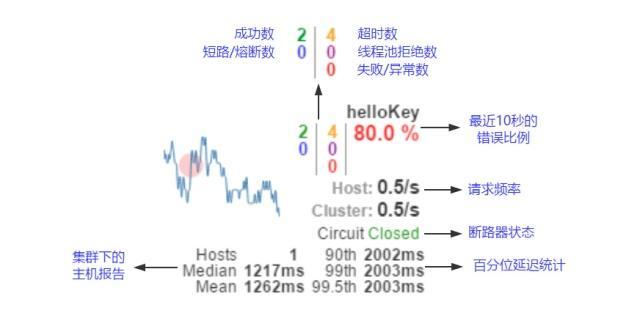
大概原理
@HystrixCommand解析过程
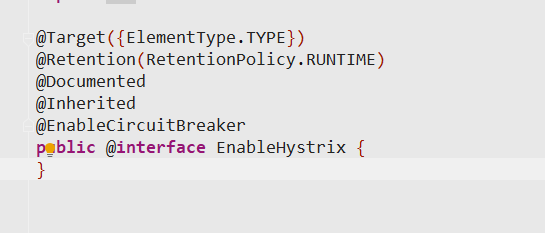

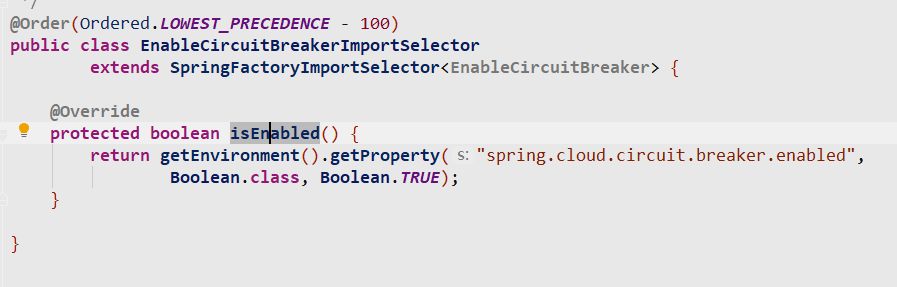
public abstract class SpringFactoryImportSelector<T>
      implements DeferredImportSelector, BeanClassLoaderAware, EnvironmentAware {

   private final Log log = LogFactory.getLog(SpringFactoryImportSelector.class);

   private ClassLoader beanClassLoader;

   private Class<T> annotationClass;

   private Environment environment;

   @SuppressWarnings("unchecked")
   protected SpringFactoryImportSelector() {
      this.annotationClass = (Class<T>) GenericTypeResolver
            .resolveTypeArgument(this.getClass(), SpringFactoryImportSelector.class);
   }

   @Override
   public String[] selectImports(AnnotationMetadata metadata) {
      if (!isEnabled()) {
         return new String[0];
      }
      AnnotationAttributes attributes = AnnotationAttributes.fromMap(
            metadata.getAnnotationAttributes(this.annotationClass.getName(), true));

      Assert.notNull(attributes, "No " + getSimpleName() + " attributes found. Is "
            + metadata.getClassName() + " annotated with @" + getSimpleName() + "?");

      // Find all possible auto configuration classes, filtering duplicates
       //获取到spring.factories文件中org.springframework.cloud.client.circuitbreaker.EnableCircuitBreaker
       //对应的value
      List<String> factories = new ArrayList<>(new LinkedHashSet<>(SpringFactoriesLoader
            .loadFactoryNames(this.annotationClass, this.beanClassLoader)));

      if (factories.isEmpty() && !hasDefaultFactory()) {
         throw new IllegalStateException("Annotation @" + getSimpleName()
               + " found, but there are no implementations. Did you forget to include a starter?");
      }

      if (factories.size() > 1) {
         // there should only ever be one DiscoveryClient, but there might be more than
         // one factory
         this.log.warn("More than one implementation " + "of @" + getSimpleName()
               + " (now relying on @Conditionals to pick one): " + factories);
      }
	//最后把所有的EnableCircuitBreaker对应的value都注入到容器
      return factories.toArray(new String[factories.size()]);
   }

   protected boolean hasDefaultFactory() {
      return false;
   }

   protected abstract boolean isEnabled();

   protected String getSimpleName() {
      return this.annotationClass.getSimpleName();
   }

   protected Class<T> getAnnotationClass() {
      return this.annotationClass;
   }

   protected Environment getEnvironment() {
      return this.environment;
   }

   @Override
   public void setEnvironment(Environment environment) {
      this.environment = environment;
   }

   @Override
   public void setBeanClassLoader(ClassLoader classLoader) {
      this.beanClassLoader = classLoader;
   }

}
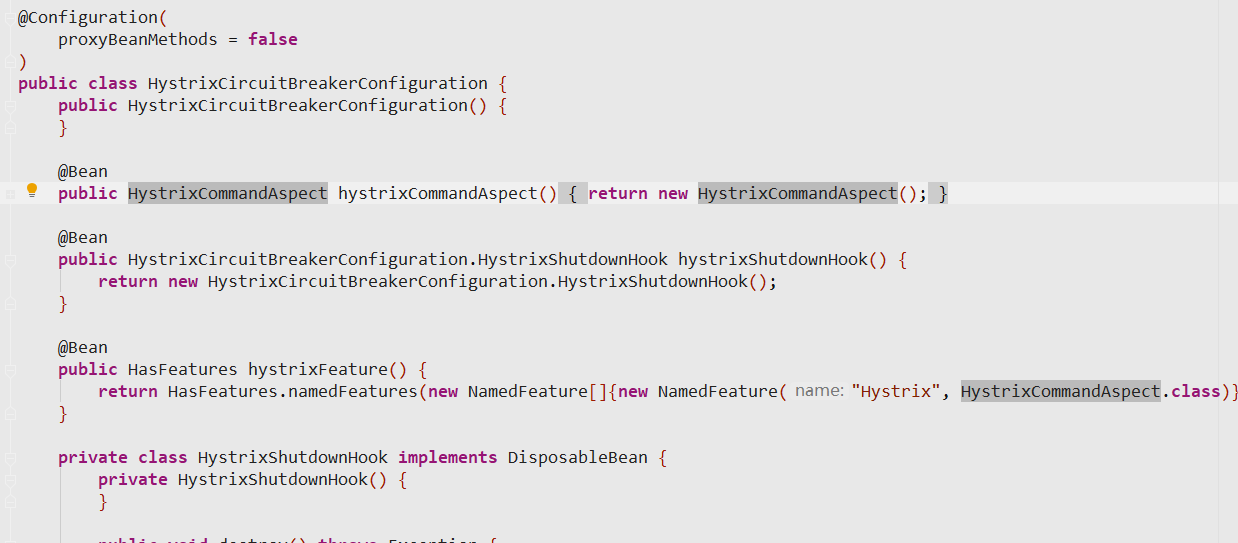
注入了HystrixCircuitBreakerConfiguration

在configuration中又注入了一个AOP
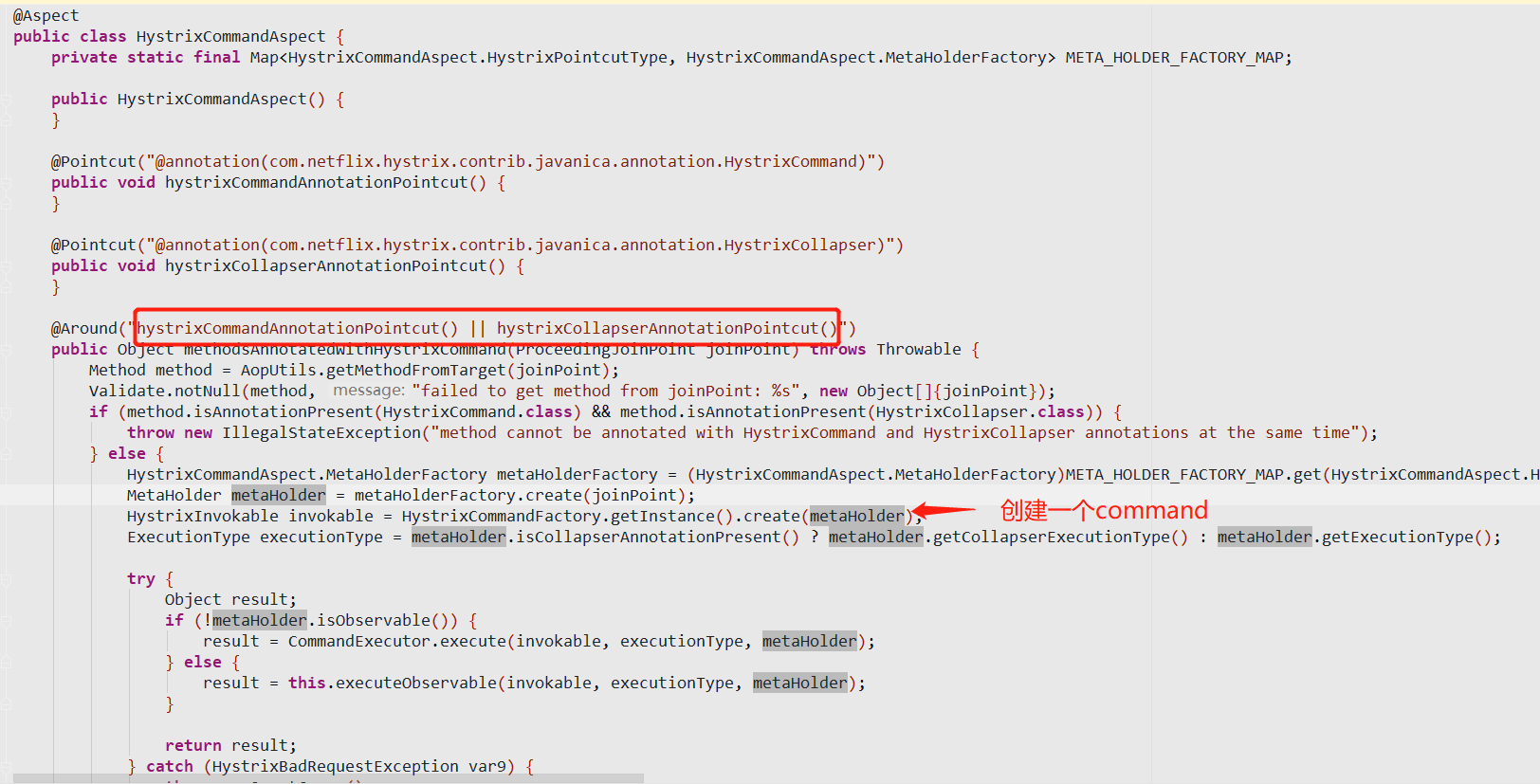
Command
线程隔离
/**
这个方法是AbstractCommand的构造方法,里面用于初使化AbstractCommand,包括circuitBreaker 与线程池对象都在这里进行构造
**/
    protected AbstractCommand(HystrixCommandGroupKey group, HystrixCommandKey key, HystrixThreadPoolKey threadPoolKey, HystrixCircuitBreaker circuitBreaker, HystrixThreadPool threadPool,
            HystrixCommandProperties.Setter commandPropertiesDefaults, HystrixThreadPoolProperties.Setter threadPoolPropertiesDefaults,
            HystrixCommandMetrics metrics, TryableSemaphore fallbackSemaphore, TryableSemaphore executionSemaphore,
            HystrixPropertiesStrategy propertiesStrategy, HystrixCommandExecutionHook executionHook) {
//commandGroup对象,用于组织一类业务相关的对象
        this.commandGroup = initGroupKey(group);
// commandKey默认是以类为为名称的
        this.commandKey = initCommandKey(key, getClass());
        this.properties = initCommandProperties(this.commandKey, propertiesStrategy, commandPropertiesDefaults);
//这个方法里定义了TheradPool里的关键字,默认以传入的commandGroup 的name做为key的名称
        this.threadPoolKey = initThreadPoolKey(threadPoolKey, this.commandGroup, this.properties.executionIsolationThreadPoolKeyOverride().get());
        this.metrics = initMetrics(metrics, this.commandGroup, this.threadPoolKey, this.commandKey, this.properties);
        this.circuitBreaker = initCircuitBreaker(this.properties.circuitBreakerEnabled().get(), circuitBreaker, this.commandGroup, this.commandKey, this.properties, this.metrics);
//这里就是线程池对象啦。
        this.threadPool = initThreadPool(threadPool, this.threadPoolKey, threadPoolPropertiesDefaults);

        //Strategies from plugins
        this.eventNotifier = HystrixPlugins.getInstance().getEventNotifier();
        this.concurrencyStrategy = HystrixPlugins.getInstance().getConcurrencyStrategy();
        HystrixMetricsPublisherFactory.createOrRetrievePublisherForCommand(this.commandKey, this.commandGroup, this.metrics, this.circuitBreaker, this.properties);
        this.executionHook = initExecutionHook(executionHook);

        this.requestCache = HystrixRequestCache.getInstance(this.commandKey, this.concurrencyStrategy);
        this.currentRequestLog = initRequestLog(this.properties.requestLogEnabled().get(), this.concurrencyStrategy);

        /* fallback semaphore override if applicable */
        this.fallbackSemaphoreOverride = fallbackSemaphore;

        /* execution semaphore override if applicable */
        this.executionSemaphoreOverride = executionSemaphore;
    }

/**
这个方法用于得到HystrixThreadPoolKey 对象, Hystrix内部有大量的Key对象,可以简单理解这些  Key都是相应对象的唯一标识。从代码里可以看出,默认情况下Hystrix采用的是commandGroup 的name做为Thread Pool的key值。
**/
    private static HystrixThreadPoolKey initThreadPoolKey(HystrixThreadPoolKey threadPoolKey, HystrixCommandGroupKey groupKey, String threadPoolKeyOverride) {
        if (threadPoolKeyOverride == null) {
            // we don't have a property overriding the value so use either HystrixThreadPoolKey or HystrixCommandGroup
            if (threadPoolKey == null) {
                /* use HystrixCommandGroup if HystrixThreadPoolKey is null */
                return HystrixThreadPoolKey.Factory.asKey(groupKey.name());
            } else {
                return threadPoolKey;
            }
        } else {
            // we have a property defining the thread-pool so use it instead
            return HystrixThreadPoolKey.Factory.asKey(threadPoolKeyOverride);
        }
    }

/**
在这里将调用具体的构造线程池的方法。
**/
    private static HystrixThreadPool initThreadPool(HystrixThreadPool fromConstructor, HystrixThreadPoolKey threadPoolKey, HystrixThreadPoolProperties.Setter threadPoolPropertiesDefaults) {
        if (fromConstructor == null) {
            // get the default implementation of HystrixThreadPool
            return HystrixThreadPool.Factory.getInstance(threadPoolKey, threadPoolPropertiesDefaults);
        } else {
            return fromConstructor;
        }
}从上面的代码分析我们知道线程池的构造最终会落到HystrixThreadPool.Factory这个类上面。这个类内存持有一个ConcurrentHashMap用于缓存线程池对象,当传入的HystrixThreadPoolKey已经构造过了相应的ThreadPool,将会直接从ConcurrentHashMap里返回已经生成的ThreadPool。如果传入的HystrixThreadPoolKey没有相应的ThreadPool,将构造新的ThreadPool并放入到ConcurrentHashMap这个缓存对象上。下面是关键代码:
static class Factory {
  final static ConcurrentHashMap<String, HystrixThreadPool> threadPools = new ConcurrentHashMap<String, HystrixThreadPool>();

static HystrixThreadPool getInstance(HystrixThreadPoolKey threadPoolKey, HystrixThreadPoolProperties.Setter propertiesBuilder) {
            // get the key to use instead of using the object itself so that if people forget to implement equals/hashcode things will still work
            String key = threadPoolKey.name();

            // this should find it for all but the first time
//这里从缓存取
            HystrixThreadPool previouslyCached = threadPools.get(key);
            if (previouslyCached != null) {
                return previouslyCached;
            }

            // if we get here this is the first time so we need to initialize
//这里需要保证线程安全,加上了相应的锁
            synchronized (HystrixThreadPool.class) {
                if (!threadPools.containsKey(key)) {
//具体的线程池是由HystrixThreadPoolDefault进行构造的
                    threadPools.put(key, new HystrixThreadPoolDefault(threadPoolKey, propertiesBuilder));
                }
            }
            return threadPools.get(key);
        }
}


////////////////////////////////
//HystrixThreadPoolDefault 内部通过HystrixConcurrencyStrategy这个对象进行线程池的构造,里面根据传入的properties信息来构造线程池对象。 关键代码如下:
static class HystrixThreadPoolDefault implements HystrixThreadPool {
        private static final Logger logger = LoggerFactory.getLogger(HystrixThreadPoolDefault.class);

        private final HystrixThreadPoolProperties properties;
        private final BlockingQueue<Runnable> queue;
        private final ThreadPoolExecutor threadPool;
        private final HystrixThreadPoolMetrics metrics;
        private final int queueSize;

        public HystrixThreadPoolDefault(HystrixThreadPoolKey threadPoolKey, HystrixThreadPoolProperties.Setter propertiesDefaults) {
            this.properties = HystrixPropertiesFactory.getThreadPoolProperties(threadPoolKey, propertiesDefaults);
            HystrixConcurrencyStrategy concurrencyStrategy = HystrixPlugins.getInstance().getConcurrencyStrategy();
            this.queueSize = properties.maxQueueSize().get();

            this.metrics = HystrixThreadPoolMetrics.getInstance(threadPoolKey,
                    concurrencyStrategy.getThreadPool(threadPoolKey, properties),
                    properties);
            this.threadPool = this.metrics.getThreadPool();
            this.queue = this.threadPool.getQueue();

            /* strategy: HystrixMetricsPublisherThreadPool */
            HystrixMetricsPublisherFactory.createOrRetrievePublisherForThreadPool(threadPoolKey, this.metrics, this.properties);
        }
}

///HystrixConcurrencyStrategy 类里我们可以看到采用的我们熟悉的ThreadPoolExecutor对象来构造线程池。 里面需要传入核心线程池的大小,最大线程数,队列等关键信息。
    public ThreadPoolExecutor getThreadPool(final HystrixThreadPoolKey threadPoolKey, HystrixThreadPoolProperties threadPoolProperties) {
        final ThreadFactory threadFactory = getThreadFactory(threadPoolKey);

        final boolean allowMaximumSizeToDivergeFromCoreSize = threadPoolProperties.getAllowMaximumSizeToDivergeFromCoreSize().get();
        final int dynamicCoreSize = threadPoolProperties.coreSize().get();
        final int keepAliveTime = threadPoolProperties.keepAliveTimeMinutes().get();
        final int maxQueueSize = threadPoolProperties.maxQueueSize().get();
        final BlockingQueue<Runnable> workQueue = getBlockingQueue(maxQueueSize);

        if (allowMaximumSizeToDivergeFromCoreSize) {
            final int dynamicMaximumSize = threadPoolProperties.maximumSize().get();
            if (dynamicCoreSize > dynamicMaximumSize) {
                logger.error("Hystrix ThreadPool configuration at startup for : " + threadPoolKey.name() + " is trying to set coreSize = " +
                        dynamicCoreSize + " and maximumSize = " + dynamicMaximumSize + ".  Maximum size will be set to " +
                        dynamicCoreSize + ", the coreSize value, since it must be equal to or greater than the coreSize value");
                return new ThreadPoolExecutor(dynamicCoreSize, dynamicCoreSize, keepAliveTime, TimeUnit.MINUTES, workQueue, threadFactory);
            } else {
                return new ThreadPoolExecutor(dynamicCoreSize, dynamicMaximumSize, keepAliveTime, TimeUnit.MINUTES, workQueue, threadFactory);
            }
        } else {
            return new ThreadPoolExecutor(dynamicCoreSize, dynamicCoreSize, keepAliveTime, TimeUnit.MINUTES, workQueue, threadFactory);
        }
    }
熔断
//找到AbstractCommand类的initCircuitBreaker方法,这是熔断器的构造方法入口。首先判断是否打开了熔断器,只有在打开了熔断器后才会通过HystrixCircuitBreaker.Factory工厂新建一个熔断器,源码如下:

private static HystrixCircuitBreaker initCircuitBreaker(boolean enabled, HystrixCircuitBreaker fromConstructor,HystrixCommandGroupKey groupKey, HystrixCommandKey commandKey,HystrixCommandProperties properties, HystrixCommandMetrics metrics) {
        if (enabled) {
            if (fromConstructor == null) {
                // get the default implementation of HystrixCircuitBreaker
                return HystrixCircuitBreaker.Factory.getInstance(commandKey, groupKey, properties, metrics);
            } else {
                return fromConstructor;
            }
        } else {
            return new NoOpCircuitBreaker();
        }
    }

//HystrixCircuitBreaker.Factory 类里对熔断器根据CommandKey进行了缓存,如果存在直接取缓存里的key,不存在则新建HystrixCircuitBreakerImpl对象用于熔断操作。源代码如下:

class Factory {
      //circuitBreakersByCommand 是个ConcurrentHashMap, 这里缓存了系统的所有熔断器
        private static ConcurrentHashMap<String, HystrixCircuitBreaker> circuitBreakersByCommand = new ConcurrentHashMap<String, HystrixCircuitBreaker>();

        public static HystrixCircuitBreaker getInstance(HystrixCommandKey key, HystrixCommandGroupKey group, HystrixCommandProperties properties, HystrixCommandMetrics metrics) {
            // this should find it for all but the first time
  //先从缓存里取
            HystrixCircuitBreaker previouslyCached = circuitBreakersByCommand.get(key.name());
            if (previouslyCached != null) {
                return previouslyCached;
            }

            // if we get here this is the first time so we need to initialize

            // Create and add to the map ... use putIfAbsent to atomically handle the possible race-condition of
            // 2 threads hitting this point at the same time and let ConcurrentHashMap provide us our thread-safety
            // If 2 threads hit here only one will get added and the other will get a non-null response instead.
 //取不到对象才会创建个HystrixCircuitBreakerImpl对象并放入缓存Map中
            HystrixCircuitBreaker cbForCommand = circuitBreakersByCommand.putIfAbsent(key.name(), new HystrixCircuitBreakerImpl(key, group, properties, metrics));
            if (cbForCommand == null) {
                // this means the putIfAbsent step just created a new one so let's retrieve and return it
                return circuitBreakersByCommand.get(key.name());
            } else {
                // this means a race occurred and while attempting to 'put' another one got there before
                // and we instead retrieved it and will now return it
                return cbForCommand;
            }
        }

        /**
         * Get the {@link HystrixCircuitBreaker} instance for a given {@link HystrixCommandKey} or null if none exists.
         *
         * @param key
         *            {@link HystrixCommandKey} of {@link HystrixCommand} instance requesting the {@link HystrixCircuitBreaker}
         * @return {@link HystrixCircuitBreaker} for {@link HystrixCommandKey}
         */
        public static HystrixCircuitBreaker getInstance(HystrixCommandKey key) {
            return circuitBreakersByCommand.get(key.name());
        }

        /**
         * Clears all circuit breakers. If new requests come in instances will be recreated.
         */
        /* package */static void reset() {
            circuitBreakersByCommand.clear();
        }
    }


//HystrixCircuitBreakerImpl 这个类里定义了一个状态变量,断路由有三种状态 ,分别为关闭,打开,半开状态。重点关注下allowRequest方法,在allowRequest里首先判断forceOpen属性是否打开,如果打开则不允许有请求进入,然后forceClosed属性,如果这个属性为true,刚对所有的求求放行,相当于熔断器不起作用。之后就是状态判断了。isAfterSleepWindow()方法用于放行超过了指定时间后的流量,
class HystrixCircuitBreakerImpl implements HystrixCircuitBreaker {
        private final HystrixCommandProperties properties;
        private final HystrixCommandMetrics metrics;
  //三种状态通过枚举来定义
        enum Status {
            CLOSED, OPEN, HALF_OPEN;
        }
//状态变时,默认是关闭的状态
        private final AtomicReference<Status> status = new AtomicReference<Status>(Status.CLOSED);
//最后一次访问的时间,用于试探请求是否恢复
        private final AtomicLong circuitOpened = new AtomicLong(-1);
        private final AtomicReference<Subscription> activeSubscription = new AtomicReference<Subscription>(null);

        protected HystrixCircuitBreakerImpl(HystrixCommandKey key, HystrixCommandGroupKey commandGroup, final HystrixCommandProperties properties, HystrixCommandMetrics metrics) {
            this.properties = properties;
            this.metrics = metrics;

            //On a timer, this will set the circuit between OPEN/CLOSED as command executions occur
            Subscription s = subscribeToStream();
            activeSubscription.set(s);
        }

        private Subscription subscribeToStream() {
            /*
             * This stream will recalculate the OPEN/CLOSED status on every onNext from the health stream
             */
            return metrics.getHealthCountsStream()
                    .observe()
                    .subscribe(new Subscriber<HealthCounts>() {
                        @Override
                        public void onCompleted() {

                        }

                        @Override
                        public void onError(Throwable e) {

                        }

                        @Override
                        public void onNext(HealthCounts hc) {
                            // check if we are past the statisticalWindowVolumeThreshold
                            if (hc.getTotalRequests() < properties.circuitBreakerRequestVolumeThreshold().get()) {
                                // we are not past the minimum volume threshold for the stat window,
                                // so no change to circuit status.
                                // if it was CLOSED, it stays CLOSED
                                // if it was half-open, we need to wait for a successful command execution
                                // if it was open, we need to wait for sleep window to elapse
                            } else {
                                if (hc.getErrorPercentage() < properties.circuitBreakerErrorThresholdPercentage().get()) {
                                    //we are not past the minimum error threshold for the stat window,
                                    // so no change to circuit status.
                                    // if it was CLOSED, it stays CLOSED
                                    // if it was half-open, we need to wait for a successful command execution
                                    // if it was open, we need to wait for sleep window to elapse
                                } else {
                                    // our failure rate is too high, we need to set the state to OPEN
                                    if (status.compareAndSet(Status.CLOSED, Status.OPEN)) {
                                        circuitOpened.set(System.currentTimeMillis());
                                    }
                                }
                            }
                        }
                    });
        }
//将熔断器置于关闭状态,并重置统计数据
        @Override
        public void markSuccess() {
            if (status.compareAndSet(Status.HALF_OPEN, Status.CLOSED)) {
                //This thread wins the race to close the circuit - it resets the stream to start it over from 0
                metrics.resetStream();
                Subscription previousSubscription = activeSubscription.get();
                if (previousSubscription != null) {
                    previousSubscription.unsubscribe();
                }
                Subscription newSubscription = subscribeToStream();
                activeSubscription.set(newSubscription);
                circuitOpened.set(-1L);
            }
        }

//将熔断器置于打开状态
        @Override
        public void markNonSuccess() {
            if (status.compareAndSet(Status.HALF_OPEN, Status.OPEN)) {
                //This thread wins the race to re-open the circuit - it resets the start time for the sleep window
                circuitOpened.set(System.currentTimeMillis());
            }
        }
//用于判断熔断器是否打开
        @Override
        public boolean isOpen() {
            if (properties.circuitBreakerForceOpen().get()) {
                return true;
            }
            if (properties.circuitBreakerForceClosed().get()) {
                return false;
            }
            return circuitOpened.get() >= 0;
        }
//用于判断是否放行流量
        @Override
        public boolean allowRequest() {
            if (properties.circuitBreakerForceOpen().get()) {
                return false;
            }
            if (properties.circuitBreakerForceClosed().get()) {
                return true;
            }
//第一次请求肯定就放行了
            if (circuitOpened.get() == -1) {
                return true;
            } else {
//半开状态将不放行
                if (status.get().equals(Status.HALF_OPEN)) {
                    return false;
                } else {
                    return isAfterSleepWindow();
                }
            }
        }

//根据当前时间与最后一次请求的时候进行比较,当超过了设置的SleepWindowInMilliseconds,将放行请求用于试探服务访问是否OK
        private boolean isAfterSleepWindow() {
            final long circuitOpenTime = circuitOpened.get();
            final long currentTime = System.currentTimeMillis();
            final long sleepWindowTime = properties.circuitBreakerSleepWindowInMilliseconds().get();
            return currentTime > circuitOpenTime + sleepWindowTime;
        }

//用于试探服务是否OK的方法
        @Override
        public boolean attemptExecution() {
            if (properties.circuitBreakerForceOpen().get()) {
                return false;
            }
            if (properties.circuitBreakerForceClosed().get()) {
                return true;
            }
            if (circuitOpened.get() == -1) {
                return true;
            } else {
                if (isAfterSleepWindow()) {
                    //only the first request after sleep window should execute
                    //if the executing command succeeds, the status will transition to CLOSED
                    //if the executing command fails, the status will transition to OPEN
                    //if the executing command gets unsubscribed, the status will transition to OPEN
                    if (status.compareAndSet(Status.OPEN, Status.HALF_OPEN)) {
                        return true;
                    } else {
                        return false;
                    }
                } else {
                    return false;
                }
            }
        }
    }
配置参数
#Execution相关的属性的配置
#隔离策略,默认是Thread, 可选Thread| Semaphor
hystrix.command.default.execution.isolation.strategy

#命令执行超时时 间,默认1000ms
hystrix.command.default.execution.isolation.thread.timeoutInMilliseconds

# 执行是否启用超时,默认启用true
hystrix.command.default.execution.timeout.enabled

# 发生超时是是否中断, 默认true
hystrix.command.default.execution.isolation.thread.interruptOnTimeout

# 最大并发请求 数,默认10,该参数当使用ExecutionIsolationStrategy.SEMAPHORE策略时才有效。如果达到最大并发请求 数,请求会被拒绝。理论上选择semaphore size的原则和选择thread size一致,但选用semaphore时每次执行 的单元要比较小且执行速度快(ms级别),否则的话应该用thread。 semaphore应该占整个容器(tomcat)的线程池的一小部分。 Fallback相关的属性 这些参数可以应用于Hystrix的THREAD和SEMAPHORE策略
hystrix.command.default.execution.isolation.semaphore.maxConcurrentRequests

# 如果并发数达到 该设置值,请求会被拒绝和抛出异常并且fallback不会被调用。默认10
hystrix.command.default.fallback.isolation.semaphore.maxConcurrentRequests

# 当执行失败或者请求被拒绝,是否会尝试调用
hystrix.command.default.fallback.enabled


# Circuit Breaker相关的属性
#用来跟踪circuit的健康性,如果未达标则让request短路。默认true
hystrix.command.default.circuitBreaker.enabled

# 一个rolling window内最小的请 求数。如果设为20,那么当一个rolling window的时间内(比如说1个rolling window是10秒)收到19个请求, 即使19个请求都失败,也不会触发circuit break。默认20
hystrix.command.default.circuitBreaker.requestVolumeThreshold

# 触发短路的时间值,当该值设 为5000时,则当触发circuit break后的5000毫秒内都会拒绝request,也就是5000毫秒后才会关闭circuit。 默认5000
hystrix.command.default.circuitBreaker.sleepWindowInMilliseconds

# 错误比率阀值,如果错误率>=该 值,circuit会被打开,并短路所有请求触发fallback。默认50
hystrix.command.default.circuitBreaker.errorThresholdPercentage

# 强制打开熔断器,如果打开这个开关,那么拒绝所 有request,默认false
hystrix.command.default.circuitBreaker.forceOpen

# 强制关闭熔断器 如果这个开关打开,circuit将 一直关闭且忽略circuitBreaker.errorThresholdPercentage
hystrix.command.default.circuitBreaker.forceClosed

# Metrics相关参数

#设置统计的时间窗口值的,毫秒 值,circuit break 的打开会根据1个rolling window的统计来计算。若rolling window被设为10000毫秒, 则rolling window会被分成n个buckets,每个bucket包含success,failure,timeout,rejection的次数 的统计信息。默认10000
hystrix.command.default.metrics.rollingStats.timeInMilliseconds

# 设置一个rolling window被划分的数 量,若numBuckets=10,rolling window=10000,那么一个bucket的时间即1秒。必须符合rolling window  % numberBuckets == 0。默认10
hystrix.command.default.metrics.rollingStats.numBuckets

# 执行时是否enable指标的计算和跟踪, 默认true
hystrix.command.default.metrics.rollingPercentile.enabled

# 设置rolling  percentile window的时间,默认60000
hystrix.command.default.metrics.rollingPercentile.timeInMilliseconds

# 设置rolling percentile  window的numberBuckets。逻辑同上。默认6
hystrix.command.default.metrics.rollingPercentile.numBuckets

# 如果bucket size=100,window =10s,若这10s里有500次执行,只有最后100次执行会被统计到bucket里去。增加该值会增加内存开销以及排序 的开销。默认100
hystrix.command.default.metrics.rollingPercentile.bucketSize

# 记录health 快照(用 来统计成功和错误绿)的间隔,默认500ms
hystrix.command.default.metrics.healthSnapshot.intervalInMilliseconds


#Request Context 相关参数

# 默认true,需要重载getCacheKey(),返回null时不 缓存
hystrix.command.default.requestCache.enabled

# 记录日志到HystrixRequestLog,默认true
 hystrix.command.default.requestLog.enabled

 #Collapser Properties 相关参数

 # 单次批处理的最大请求数,达到该数量触发批处理,默认 Integer.MAX_VALU
 hystrix.collapser.default.maxRequestsInBatch

 # 触发批处理的延迟,也可以为创建批处理的时间 +该值,默认10
 hystrix.collapser.default.timerDelayInMilliseconds

 # 是否对HystrixCollapser.execute() and  HystrixCollapser.queue()的cache,默认true
 hystrix.collapser.default.requestCache.enabled

#ThreadPool 相关参数

 #线程数默认值10适用于大部分情况(有时可以设置得更小),如果需要设置得更大,那有个基本得公式可以 follow: requests per second at peak when healthy × 99th percentile latency in seconds + some  breathing room 每秒最大支撑的请求数 (99%平均响应时间 + 缓存值) 比如:每秒能处理1000个请求,99%的请求响应时间是60ms,那么公式是: 1000 (0.060+0.012)

 #基本得原则时保持线程池尽可能小,他主要是为了释放压力,防止资源被阻塞。 当一切都是正常的时候,线程池一般仅会有1到2个线程激活来提供服务

 # 并发执行的最大线程数,默认10
 hystrix.threadpool.default.coreSize

 # BlockingQueue的最大队列数,当设为-1,会使用SynchronousQueue,值为正时使用LinkedBlcokingQueue。该设置只会在初始化时有效,之后不能修改threadpool的queue size,除非reinitialising thread executor。默认-1。
 hystrix.threadpool.default.maxQueueSize
 # 即使maxQueueSize没有达到,达到 queueSizeRejectionThreshold该值后,请求也会被拒绝。因为maxQueueSize不能被动态修改,这个参数将允 许我们动态设置该值。if maxQueueSize == -1,该字段将不起作用 hystrix.threadpool.default.keepAliveTimeMinutes 如果corePoolSize和maxPoolSize设成一样(默认 实现)该设置无效。如果通过plugin(https://github.com/Netflix/Hystrix/wiki/Plugins)使用自定义 实现,该设置才有用,默认1.
 hystrix.threadpool.default.queueSizeRejectionThreshold
 #线程池统计指标的时间,默 认10000
 hystrix.threadpool.default.metrics.rollingStats.timeInMilliseconds
 # 将rolling window划分为n个 buckets,默认10
 hystrix.threadpool.default.metrics.rollingStats.numBuckets