02QuickStart
本文最后更新于 2022-08-28 11:30:56
QuackStart
依赖
<dependencies>
    <dependency>
        <groupId>org.apache.flink</groupId>
        <artifactId>flink-scala_2.11</artifactId>
        <version>1.10.0</version>
    </dependency>
    <!-- https://mvnrepository.com/artifact/org.apache.flink/flink-streaming-scala -->
    <dependency>
        <groupId>org.apache.flink</groupId>
        <artifactId>flink-streaming-scala_2.11</artifactId>
        <version>1.10.0</version>
    </dependency>
    <!--flink 1.13需要该依赖-->
    <dependency>
            <groupId>org.apache.flink</groupId>
            <artifactId>flink-clients_2.11</artifactId>
            <version>1.13.0</version>
        </dependency>
</dependencies>


<build>
    <plugins>
        <!-- 该插件用于将Scala代码编译成class文件 -->
        <plugin>
            <groupId>net.alchim31.maven</groupId>
            <artifactId>scala-maven-plugin</artifactId>
            <version>3.4.6</version>
            <executions>
                <execution>
                    <!-- 声明绑定到maven的compile阶段 -->
                    <goals>
                        <goal>compile</goal>
                    </goals>
                </execution>
            </executions>
        </plugin>
        <plugin>
            <groupId>org.apache.maven.plugins</groupId>
            <artifactId>maven-assembly-plugin</artifactId>
            <version>3.0.0</version>
            <configuration>
                <descriptorRefs>
                    <descriptorRef>jar-with-dependencies</descriptorRef>
                </descriptorRefs>
            </configuration>
            <executions>
                <execution>
                    <id>make-assembly</id>
                    <phase>package</phase>
                    <goals>
                        <goal>single</goal>
                    </goals>
                </execution>
            </executions>
        </plugin>
    </plugins>
</build>
批处理方式
def main(args: Array[String]): Unit = {
  //创建执行环境
  val env = ExecutionEnvironment.getExecutionEnvironment
  //读取数据
  val dataSet: DataSet[String] = env.readTextFile("D:\\IDEA\\flink-study\\first\\src\\main\\resources\\1.txt")
  val res: DataSet[(String, Int)] = dataSet
    //需要导入隐式 org.apache.flink.api.scala._
    //底层将所有类型包装成 TypeInformation
    .flatMap(_.split(" "))
    .map((_, 1))
    .groupBy(0)  //按照元组第一个进行分组,可以传多个参数
    .sum(1)   //按照元组第二个进行求和聚合
  res.print()
}
流处理方式
object StreamWordCount {
  def main(args: Array[String]): Unit = {
    //创建流式执行环境
    val env = StreamExecutionEnvironment.getExecutionEnvironment
    env.setParallelism(8) //可以设置并行度

    //flink提供的工具类
    //可以从args,也可以从map,也可以从properties
    val param: ParameterTool = ParameterTool.fromArgs(args)
    val host = param.get("host")
    val port = param.getInt("port")

    val stream = env.socketTextStream(host, port)
    stream.flatMap(_.split(" "))
      .map((_, 1))
      .keyBy(0)
      .sum(1)
      .print()
      .setParallelism(1) //也可以设置并行度

    env.execute("stream word count job")
  }
}
集群简单配置
slaves
node1
node2
node3
flink-conf.yaml
#jobmanager地址
jobmanager.rpc.address: node1

# The RPC port where the JobManager is reachable.
#JobManager通信端口
jobmanager.rpc.port: 6123


# The heap size for the JobManager JVM
#jobManager堆大小
jobmanager.heap.size: 1024m


# The total process memory size for the TaskManager.
#
# Note this accounts for all memory usage within the TaskManager process, including JVM metaspace and other overhead.
#taskmanager堆大小
taskmanager.memory.process.size: 1568m

# To exclude JVM metaspace and overhead, please, use total Flink memory size instead of 'taskmanager.memory.process.size'.
# It is not recommended to set both 'taskmanager.memory.process.size' and Flink memory.
#
# taskmanager.memory.flink.size: 1280m

# The number of task slots that each TaskManager offers. Each slot runs one parallel pipeline.
# 任务槽大小,同一个操作(比如map等)的并行度为n,那么需要占用的任务槽就是n,不同的操作不影响
taskmanager.numberOfTaskSlots: 4
#默认并行度
parallelism.default: 1

jobmanager.execution.failover-strategy: region
启动集群
bin/start-cluster.sh停止集群
bin/stop-cluster.sh命令行提交任务
--host node1 --port 9999为程序中传入参数
bin/flink run -c priv.king.WordCount -p xxxx.jar --host node1 --port 9999命令行任务列表
bin/flink list命令行取消任务
bin/flink cancel jobIdFlink on Yarn
Session-cluster 模式
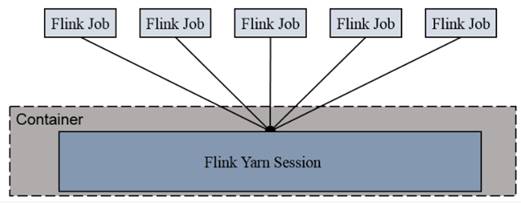
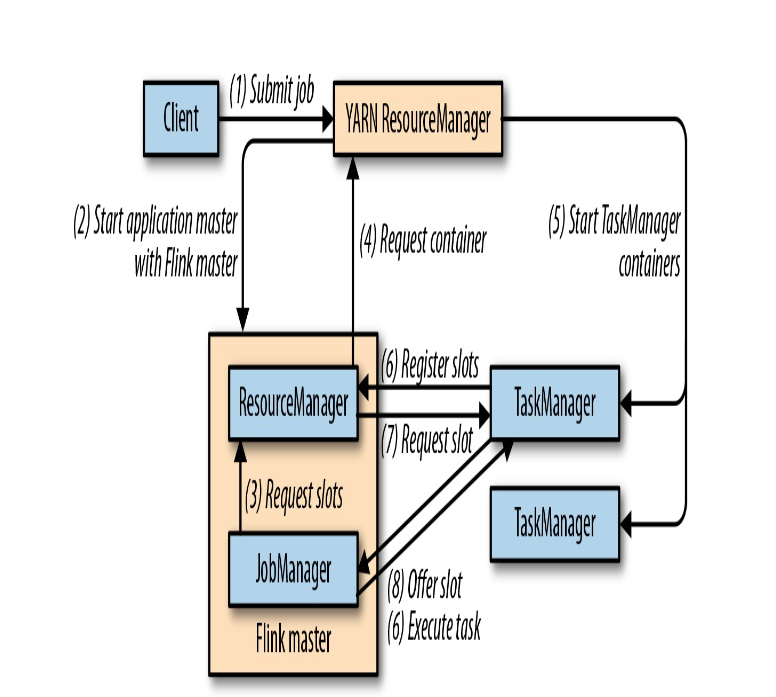
Session-Cluster模式需要先启动集群,然后再提交作业,接着会向yarn申请一块空间后,资源永远保持不变。如果资源满了,下一个作业就无法提交,只能等到yarn中的其中一个作业执行完成后,释放了资源,下个作业才会正常提交。所有作业共享Dispatcher和ResourceManager;共享资源;适合规模小执行时间短的作业。
- 启动yarn集群
- 启动yarn-session
./yarn-session.sh -n 2 -s 2 -jm 1024 -tm 1024 -nm test -d- -n(–container):TaskManager的数量。
- -s(–slots): 每个TaskManager的slot数量,默认一个slot一个core,默认每个taskmanager的slot的个数为1,有时可以多一些taskmanager,做冗余。
- -jm:JobManager的内存(单位MB)。
- -tm:每个taskmanager的内存(单位MB)。
- -nm:yarn 的appName(现在yarn的ui上的名字)。
- -d:后台执行。
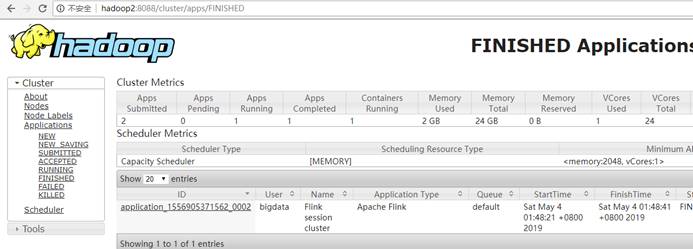
- 执行任务
./flink run -c priv.king.WordCount -p xxxx.jar --host node1 --port 9999
- 取消yarn-session
yarn application --kill application_xxxxxx
Per-Job-Cluster
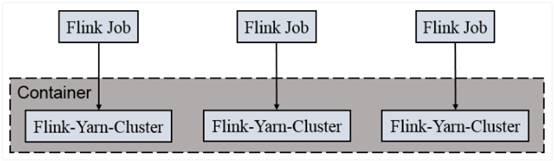
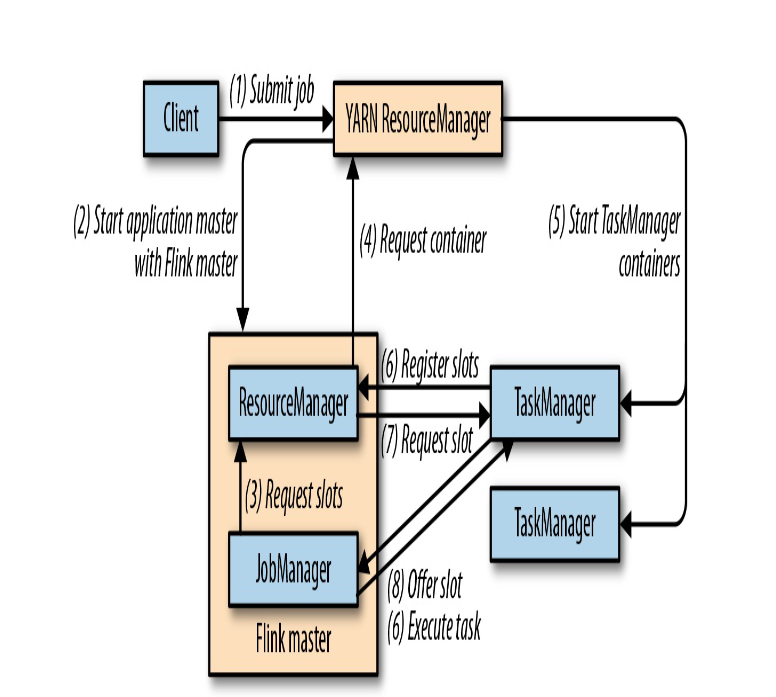
一个Job会对应一个集群,每提交一个作业会根据自身的情况,都会单独向yarn申请资源,直到作业执行完成,一个作业的失败与否并不会影响下一个作业的正常提交和运行。独享Dispatcher和ResourceManager,按需接受资源申请;适合规模大长时间运行的作业。
- 启动hadoop集群
- 直接执行job
./flink run –m yarn-cluster-c priv.king.WordCount -p xxxx.jar --host node1 --port 9999
02QuickStart
https://jiajun.xyz/2021/07/24/bigdata/11Flink/01flink_study1/02QuickStart/