07Window
本文最后更新于 2022-08-28 11:30:56
Window
窗口是处理无限流的核心。Windows将流分成有限大小的“桶”(buckets),我们可以在这些桶上进行计算。
Keyed Windows& Non-Keyed Windows
Keyed Windows是把不同的key分开聚合的窗口,可以设置并行度
Non-Keyed Windows是所有聚合起来的key的窗口,并行度只能为1
/////////////////////////////////////////////////////////////////////////////////////////
//Keyed Windows
//特俗的 GlobalWindow
def countWindow(size: Long): WindowedStream[T, K, GlobalWindow]
def countWindow(size: Long, slide: Long): WindowedStream[T, K, GlobalWindow]

def window[W <: Window](assigner: WindowAssigner[_ >: T, W]): WindowedStream[T, K, W]

stream
       .keyBy(...)               <-  keyed versus non-keyed windows
       .window(...)              <-  required: "assigner"
      [.trigger(...)]            <-  optional: "trigger" (else default trigger)
      [.evictor(...)]            <-  optional: "evictor" (else no evictor)
      [.allowedLateness(...)]    <-  optional: "lateness" (else zero)
      [.sideOutputLateData(...)] <-  optional: "output tag" (else no side output for late data)
       .reduce/aggregate/apply()      <-  required: "function"
      [.getSideOutput(...)]      <-  optional: "output tag"

/////////////////////////////////////////////////////////////////////////////////////////
//Non-Keyed Windows
def windowAll[W <: Window](assigner: WindowAssigner[_ >: T, W]): AllWindowedStream[T, W]

def countWindowAll(size: Long): AllWindowedStream[T, GlobalWindow]
def countWindowAll(size: Long, slide: Long): AllWindowedStream[T, GlobalWindow]

stream
       .windowAll(...)           <-  required: "assigner"
      [.trigger(...)]            <-  optional: "trigger" (else default trigger)
      [.evictor(...)]            <-  optional: "evictor" (else no evictor)
      [.allowedLateness(...)]    <-  optional: "lateness" (else zero)
      [.sideOutputLateData(...)] <-  optional: "output tag" (else no side output for late data)
       .reduce/aggregate/apply()      <-  required: "function"
      [.getSideOutput(...)]      <-  optional: "output tag"
window生命周期
简而言之,当第一个应该属于该窗口的元素(没有偏移量的情况下,每个窗口默认都是整点,比如一个小时大小的窗口,开始事件就是0分0秒,也就是当前时间戳能够整除窗口大小)到达时,就会创建一个窗口,当时间(event or processing time)超过它的结束时间戳加上用户指定的允许延迟(allowed lateness)时,该窗口将被完全删除。Flink保证只删除基于时间的窗口,而不删除其他类型的窗口,例如全局窗口(global windows)。例如,event-time-based窗口策略创建重叠(tumbling)窗户每5分钟,有一个允许迟到1分钟,Flink将创建一个新窗口为12点之间的间隔和12:05当第一个元素和一个时间戳,在这个区间内,当水印经过12:06时间戳时,它将删除它
此外,每个窗口将有一个触发器(Trigger)和一个函数(ProcessWindowFunction, ReduceFunction,或AggregateFunction)附加到它上。该函数将包含应用于窗口内容的计算,而Trigger指定了窗口被认为可以应用该函数的条件。触发策略可能类似于“when the number of elements in the window is more than 4”,或者“when the watermark passes the end of the window”。
除此之外,您还可以指定一个驱逐器(Evictor),它将能够在触发器触发之后以及在函数应用之前 和/或 之后从窗口中删除元素。
Window Assigners
tumbling windows, sliding windows, session windows and global windows
时间范围都是左闭右开
时间间隔可以使用Time.milliseconds(x)、Time.seconds(x)、Time.minutes(x)等等来指定
Tumbling Windows(滚动窗口)
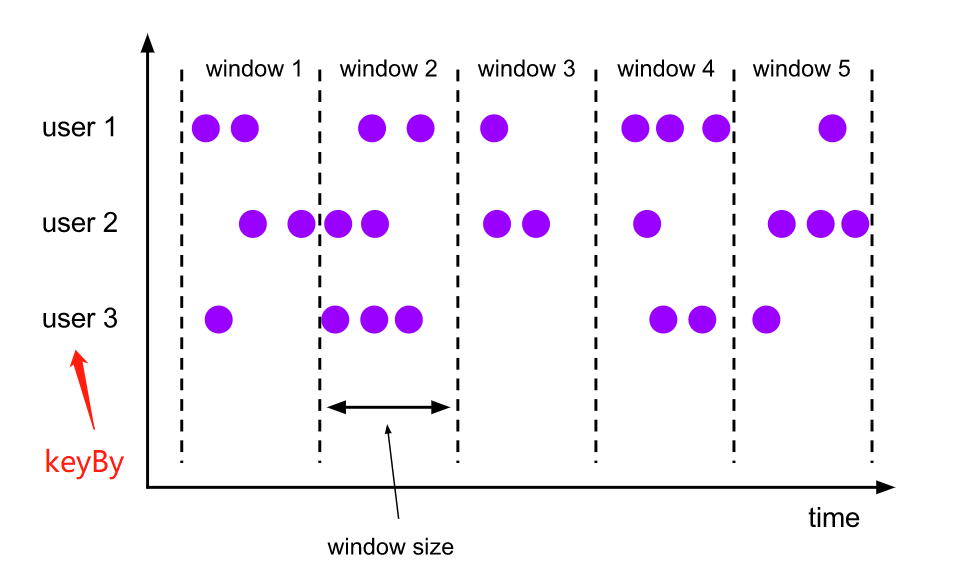
滚动窗口将每个元素赋给指定窗口大小的窗口。滚动窗口有一个固定的大小,不重叠。例如,如果你指定一个大小为5分钟的滚动窗口,当前窗口将被计算,并且每5分钟将启动一个新窗口,如下图所示。
val input: DataStream[T] = ...

// tumbling event-time windows
input
    .keyBy(<key selector>)
	//基于eventTime
    .window(TumblingEventTimeWindows.of(Time.seconds(5)))
    .<windowed transformation>(<window function>)

// tumbling processing-time windows
input
    .keyBy(<key selector>)
	//基于process
    .window(TumblingProcessingTimeWindows.of(Time.seconds(5)))
    .<windowed transformation>(<window function>)

// daily tumbling event-time windows offset by -8 hours.
input
    .keyBy(<key selector>)
	//基于eventTime,并且时间偏移量为8小时(东八区),默认UTC
    .window(TumblingEventTimeWindows.of(Time.days(1), Time.hours(-8)))
    .<windowed transformation>(<window function>)
Sliding Windows(滑动窗口)
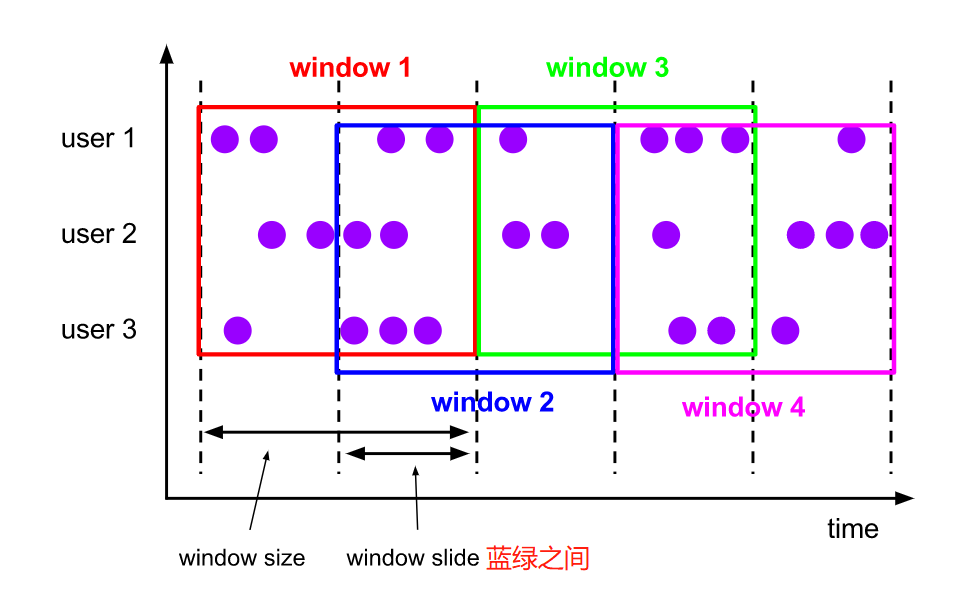
滑动窗口将元素分配给固定长度的窗口。与滚动窗口类似,窗口的大小由窗口大小参数配置。另一个窗口滑动参数控制滑动窗口的启动频率。因此,如果滑动窗口小于窗口大小,滑动窗口可以重叠。在这种情况下,元素被分配给多个窗口
val input: DataStream[T] = ...

// sliding event-time windows
input
    .keyBy(<key selector>)
    .window(SlidingEventTimeWindows.of(Time.seconds(10), Time.seconds(5)))
    .<windowed transformation>(<window function>)

// sliding processing-time windows
input
    .keyBy(<key selector>)
    .window(SlidingProcessingTimeWindows.of(Time.seconds(10), Time.seconds(5)))
    .<windowed transformation>(<window function>)

// sliding processing-time windows offset by -8 hours
input
    .keyBy(<key selector>)
    .window(SlidingProcessingTimeWindows.of(Time.hours(12), Time.hours(1), Time.hours(-8)))
    .<windowed transformation>(<window function>)
Session Windows(会话窗口)
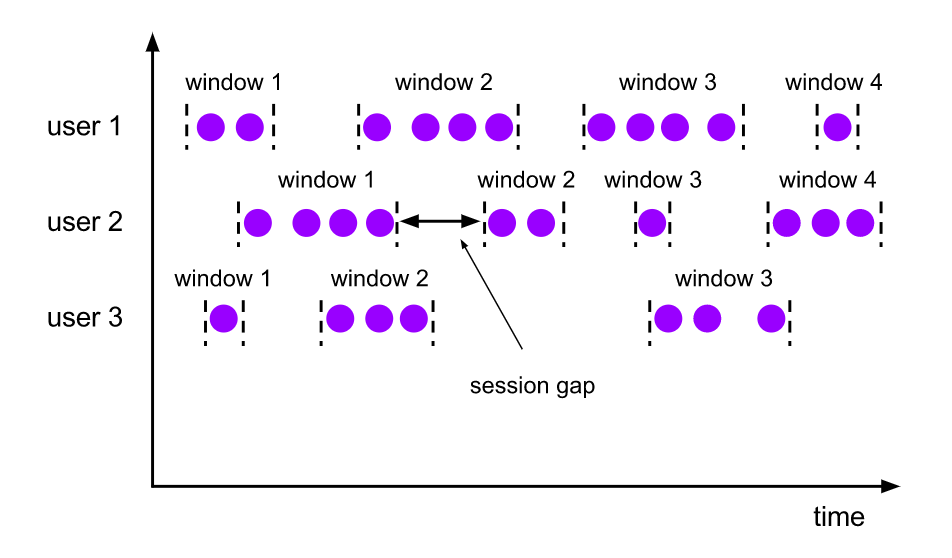
会话窗口分按活动的会话分组元素。会话窗口不重叠,也没有固定的开始和结束时间,这与滚动窗口和滑动窗口不同。相反,当会话窗口在一段时间内没有接收到元素时,即当出现不活动间隙时,会话窗口将关闭。会话窗口分配器可以配置一个静态会话间隙,也可以配置一个会话间隙提取器函数,该函数定义不活动的时间有多长。当此期限到期时,当前会话将关闭,随后的元素将被分配给一个新的会话窗口。
// event-time session windows with static gap
input
    .keyBy(<key selector>)
    .window(EventTimeSessionWindows.withGap(Time.minutes(10)))
    .<windowed transformation>(<window function>)

// event-time session windows with dynamic gap
input
    .keyBy(<key selector>)
    .window(EventTimeSessionWindows.withDynamicGap(new SessionWindowTimeGapExtractor[String] {
      override def extract(element: String): Long = {
        // determine and return session gap
      }
    }))
    .<windowed transformation>(<window function>)

// processing-time session windows with static gap
input
    .keyBy(<key selector>)
    .window(ProcessingTimeSessionWindows.withGap(Time.minutes(10)))
    .<windowed transformation>(<window function>)


// processing-time session windows with dynamic gap
input
    .keyBy(<key selector>)
    .window(DynamicProcessingTimeSessionWindows.withDynamicGap(new SessionWindowTimeGapExtractor[String] {
      override def extract(element: String): Long = {
        // determine and return session gap
      }
    }))
    .<windowed transformation>(<window function>)
Global Windows(全局窗口)
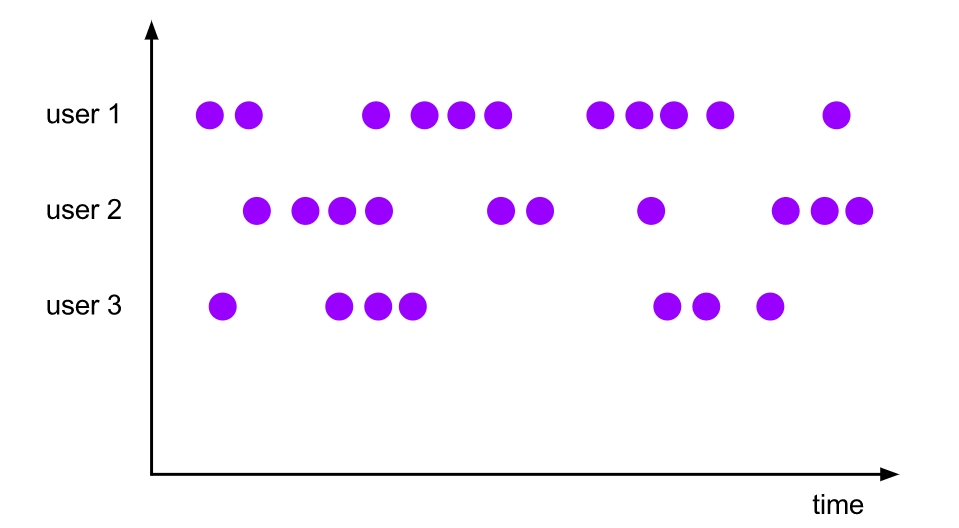
全局窗口赋值器将具有相同键的所有元素分配给同一个全局窗口。只有当您还指定了自定义触发器时,此窗口模式才有用。否则,将不执行计算,因为全局窗口没有一个可以处理聚合元素的自然端点。
val input: DataStream[T] = ...

input
    .keyBy(<key selector>)
    .window(GlobalWindows.create())
    .<windowed transformation>(<window function>)
Window Functions
窗口函数可以是ReduceFunction、AggregateFunction或ProcessWindowFunction中的一个。前两个可以更有效地执行,因为Flink可以在每个窗口的元素到达时增量聚合它们(增量聚合)。ProcessWindowFunction获取包含在窗口中的所有元素的可迭代对象(全量聚合),以及关于这些元素所属窗口的附加元信息。
使用ProcessWindowFunction的窗口转换不能像其他情况那样有效地执行,因为Flink必须在调用函数之前在内部缓冲窗口的所有元素。这可以通过将ProcessWindowFunction与ReduceFunction或AggregateFunction相结合来减轻,以获得窗口元素的增量聚合和ProcessWindowFunction接收的额外窗口元数据。
ReduceFunction
ReduceFunction指定如何组合输入中的两个元素来生成相同类型的输出元素。
/////////////////////
val input: DataStream[(String, Long)] = ...

input
    .keyBy(<key selector>)
    .window(<window assigner>)
    .reduce { (v1, v2) => (v1._1, v1._2 + v2._2) }
AggregateFunction
AggregateFunction是ReduceFunction的一般化版本,它有三种类型:输入类型(IN)、累加类型(ACC)和输出类型(OUT)。输入类型是输入流中的元素类型,AggregateFunction有一个方法可以将一个输入元素添加到累加器中(add)。该接口还具有创建初始累加器(createAccumulator)、将两个累加器合并为一个累加器(merge)以及从累加器提取输出(类型为OUT)的方法(getResult)。
与ReduceFunction相同,Flink将递增聚合
class AverageAggregate extends AggregateFunction[(String, Long), (Long, Long), Double] {
  override def createAccumulator() = (0L, 0L)

  override def add(value: (String, Long), accumulator: (Long, Long)) =
    (accumulator._1 + value._2, accumulator._2 + 1L)

  override def getResult(accumulator: (Long, Long)) = accumulator._1 / accumulator._2

  override def merge(a: (Long, Long), b: (Long, Long)) =
    (a._1 + b._1, a._2 + b._2)
}

val input: DataStream[(String, Long)] = ...

input
    .keyBy(<key selector>)
    .window(<window assigner>)
    .aggregate(new AverageAggregate)
ProcessWindowFunction
ProcessWindowFunction获得一个包含窗口所有元素的Iterable,以及一个可以访问时间和状态信息的Context对象,这使得它比其他窗口函数提供了更多的灵活性。这是以性能和资源消耗为代价的,因为不能增量聚合元素,而是需要在内部缓冲,直到认为窗口已经准备好进行处理。
abstract class ProcessWindowFunction[IN, OUT, KEY, W <: Window] extends Function {

  /**
    * Evaluates the window and outputs none or several elements.
    *
    * @param key      The key for which this window is evaluated.
    * @param context  The context in which the window is being evaluated.
    * @param elements The elements in the window being evaluated.
    * @param out      A collector for emitting elements.
    * @throws Exception The function may throw exceptions to fail the program and trigger recovery.
    */
  def process(
      key: KEY,
      context: Context,
      elements: Iterable[IN],
      out: Collector[OUT])

    //The context holding window metadata

  abstract class Context {
    // Returns the window that is being evaluated.
    def window: W
    //Returns the current processing time.
    def currentProcessingTime: Long
    //Returns the current event-time watermark.
    def currentWatermark: Long
    // State accessor for per-key and per-window state.
    def windowState: KeyedStateStore
    //State accessor for per-key global state.
    //可以获取其他同一个周期内的其他窗口状态
    def globalState: KeyedStateStore
  }

}


////////////////////////////////////////////////////////////////////
val input: DataStream[(String, Long)] = ...

input
  .keyBy(_._1)
  .window(TumblingEventTimeWindows.of(Time.minutes(5)))
  .process(new MyProcessWindowFunction())

/* ... */

class MyProcessWindowFunction extends ProcessWindowFunction[(String, Long), String, String, TimeWindow] {

  def process(key: String, context: Context, input: Iterable[(String, Long)], out: Collector[String]) = {
    var count = 0L
    for (in <- input) {
      count = count + 1
    }
    out.collect(s"Window ${context.window} count: $count")
  }
}
ProcessWindowFunction with Incremental Aggregation
返回窗口中最小的事件以及窗口的开始时间。
val input: DataStream[SensorReading] = ...

input
  .keyBy(<key selector>)
  .window(<window assigner>)
  .reduce(
    (r1: SensorReading, r2: SensorReading) => { if (r1.value > r2.value) r2 else r1 },
    ( key: String,
      context: ProcessWindowFunction[_, _, _, TimeWindow]#Context,
      minReadings: Iterable[SensorReading],
      out: Collector[(Long, SensorReading)] ) =>
      {
        val min = minReadings.iterator.next()
        out.collect((context.window.getStart, min))
      }
  )
计算平均值,并同时发出键和窗口
val input: DataStream[(String, Long)] = ...

input
  .keyBy(<key selector>)
  .window(<window assigner>)
  .aggregate(new AverageAggregate(), new MyProcessWindowFunction())

// Function definitions

/**
 * The accumulator is used to keep a running sum and a count. The [getResult] method
 * computes the average.
 */
class AverageAggregate extends AggregateFunction[(String, Long), (Long, Long), Double] {
  override def createAccumulator() = (0L, 0L)

  override def add(value: (String, Long), accumulator: (Long, Long)) =
    (accumulator._1 + value._2, accumulator._2 + 1L)

  override def getResult(accumulator: (Long, Long)) = accumulator._1 / accumulator._2

  override def merge(a: (Long, Long), b: (Long, Long)) =
    (a._1 + b._1, a._2 + b._2)
}

class MyProcessWindowFunction extends ProcessWindowFunction[Double, (String, Double), String, TimeWindow] {

  def process(key: String, context: Context, averages: Iterable[Double], out: Collector[(String, Double)]) = {
    val average = averages.iterator.next()
    out.collect((key, average))
  }
}
Triggers
触发器决定窗口何时可以由窗口函数处理。每个WindowAssigner都有一个默认的触发器。
触发器接口有五个方法,允许触发器对不同的事件作出反应:
- 前三种方法通过返回一个TriggerResult来决定如何处理它们的调用事件
- CONTINUE:什么也不做
- FIRE:触发计算
- PURGE:清除窗口中的元素
- FIRE_AND_PURGE:触发计算,然后清除窗口中的元素
- onElement() 对于添加到窗口中的每个元素,都会调用方法。
- onEventTime()方法在注册的事件时间计时器触发时被调用。
- onProcessingTime()方法在注册的处理时间计时器触发时被调用。
- onMerge()方法与有状态触发器相关,当它们对应的窗口合并时,合并两个触发器的状态,例如使用会话窗口时。
- clear() 删除相应窗口所需的任何操作。
内置Trigger
- EventTimeTrigger是基于通过水印测量的事件时间的进展来触发的。
- ProcessingTimeTrigger基于处理时间触发。
- CountTrigger 一旦窗口中的元素数量超过了给定的限制,就会触发。
- PurgingTrigger 接受另一个触发器作为参数,并将其转换为一个PurgingTrigger
@PublicEvolving
public class CountTrigger<W extends Window> extends Trigger<Object, W> {
    private static final long serialVersionUID = 1L;

    private final long maxCount;

    private final ReducingStateDescriptor<Long> stateDesc =
            new ReducingStateDescriptor<>("count", new Sum(), LongSerializer.INSTANCE);

    private CountTrigger(long maxCount) {
        this.maxCount = maxCount;
    }

    @Override
    public TriggerResult onElement(Object element, long timestamp, W window, TriggerContext ctx)
            throws Exception {
        ReducingState<Long> count = ctx.getPartitionedState(stateDesc);
        count.add(1L);
        if (count.get() >= maxCount) {
            count.clear();
            return TriggerResult.FIRE;
        }
        return TriggerResult.CONTINUE;
    }

    @Override
    public TriggerResult onEventTime(long time, W window, TriggerContext ctx) {
        return TriggerResult.CONTINUE;
    }

    @Override
    public TriggerResult onProcessingTime(long time, W window, TriggerContext ctx)
            throws Exception {
        return TriggerResult.CONTINUE;
    }

    @Override
    public void clear(W window, TriggerContext ctx) throws Exception {
        ctx.getPartitionedState(stateDesc).clear();
    }

    @Override
    public boolean canMerge() {
        return true;
    }

    @Override
    public void onMerge(W window, OnMergeContext ctx) throws Exception {
        ctx.mergePartitionedState(stateDesc);
    }

    @Override
    public String toString() {
        return "CountTrigger(" + maxCount + ")";
    }

    /**
     * Creates a trigger that fires once the number of elements in a pane reaches the given count.
     *
     * @param maxCount The count of elements at which to fire.
     * @param <W> The type of {@link Window Windows} on which this trigger can operate.
     */
    public static <W extends Window> CountTrigger<W> of(long maxCount) {
        return new CountTrigger<>(maxCount);
    }

    private static class Sum implements ReduceFunction<Long> {
        private static final long serialVersionUID = 1L;

        @Override
        public Long reduce(Long value1, Long value2) throws Exception {
            return value1 + value2;
        }
    }
}
public class PurgingTrigger<T, W extends Window> extends Trigger<T, W> {
private static final long serialVersionUID = 1L;
private Trigger<T, W> nestedTrigger;
private PurgingTrigger(Trigger<T, W> nestedTrigger) {
this.nestedTrigger = nestedTrigger;
}
@Override
public TriggerResult onElement(T element, long timestamp, W window, TriggerContext ctx)
throws Exception {
TriggerResult triggerResult = nestedTrigger.onElement(element, timestamp, window, ctx);
return triggerResult.isFire() ? TriggerResult.FIRE_AND_PURGE : triggerResult;
}
@Override
public TriggerResult onEventTime(long time, W window, TriggerContext ctx) throws Exception {
TriggerResult triggerResult = nestedTrigger.onEventTime(time, window, ctx);
return triggerResult.isFire() ? TriggerResult.FIRE_AND_PURGE : triggerResult;
}
@Override
public TriggerResult onProcessingTime(long time, W window, TriggerContext ctx)
throws Exception {
TriggerResult triggerResult = nestedTrigger.onProcessingTime(time, window, ctx);
return triggerResult.isFire() ? TriggerResult.FIRE_AND_PURGE : triggerResult;
}
@Override
public void clear(W window, TriggerContext ctx) throws Exception {
nestedTrigger.clear(window, ctx);
}
@Override
public boolean canMerge() {
return nestedTrigger.canMerge();
}
@Override
public void onMerge(W window, OnMergeContext ctx) throws Exception {
nestedTrigger.onMerge(window, ctx);
}
@Override
public String toString() {
return "PurgingTrigger(" + nestedTrigger.toString() + ")";
}
/**
* Creates a new purging trigger from the given {@code Trigger}.
*
* @param nestedTrigger The trigger that is wrapped by this purging trigger
*/
public static <T, W extends Window> PurgingTrigger<T, W> of(Trigger<T, W> nestedTrigger) {
return new PurgingTrigger<>(nestedTrigger);
}
@VisibleForTesting
public Trigger<T, W> getNestedTrigger() {
return nestedTrigger;
}
}Evictors
驱逐器能够在触发器触发后以及在应用窗口函数之前和/或之后从窗口中删除元素
- CountEvictor:保持窗口中用户指定的元素数量,并丢弃窗口缓冲区开头的剩余元素。
- DeltaEvictor:接受一个deltfunctions和一个阈值,计算窗口缓冲区中最后一个元素和其余每个元素之间的增量,并删除增量大于或等于阈值的元素。
- TimeEvictor:接受以毫秒为单位的interval作为参数,对于给定的窗口,它在其元素中查找最大时间戳max_ts,并删除时间戳小于max_ts - interval的所有元素。
/**
 * Optionally evicts elements. Called before windowing function.
 *
 * @param elements The elements currently in the pane.
 * @param size The current number of elements in the pane.
 * @param window The {@link Window}
 * @param evictorContext The context for the Evictor
 */
void evictBefore(Iterable<TimestampedValue<T>> elements, int size, W window, EvictorContext evictorContext);

/**
 * Optionally evicts elements. Called after windowing function.
 *
 * @param elements The elements currently in the pane.
 * @param size The current number of elements in the pane.
 * @param window The {@link Window}
 * @param evictorContext The context for the Evictor
 */
void evictAfter(Iterable<TimestampedValue<T>> elements, int size, W window, EvictorContext evictorContext);