04函数
本文最后更新于 2021-08-16 10:57:30
函数
查看函数
- 函数有库的概念,系统提供的除外,系统提供的函数可以在任意库使用!
- 查看当前库所有的函数:
show functions; - 查看函数的使用:
desc function 函数名; - 查看函数的详细使用:
desc function extended 函数名;
函数分类
- 函数来源
- 系统函数
- 用户自定义函数
- 函数特征
- UDF:用户定义函数 一进一出
- UDTF:用户定义表生成函数,一进多出 传入一个参数,返回一个结果集,UDTF必须紧跟select,并且不能有其他查询参数
- UDAF:用户定义聚集函数 多进一出 类似于 count avg
常用函数
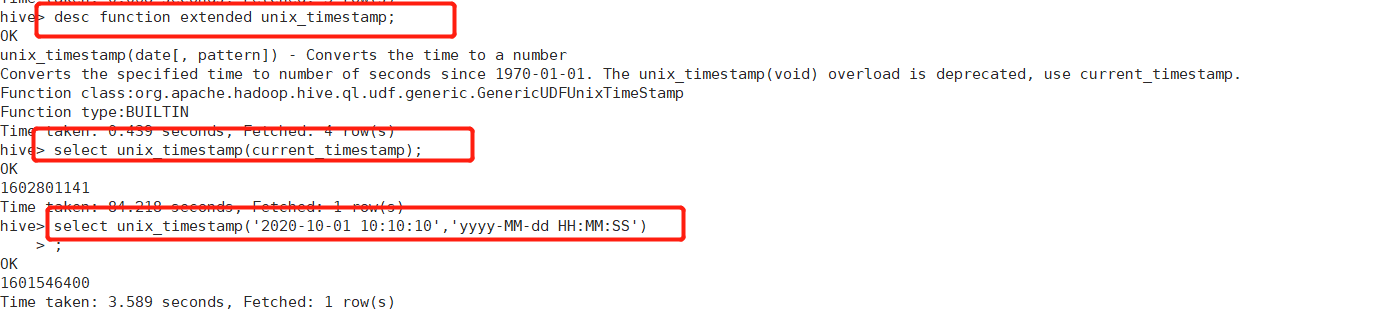
unix_timestamp()->时间转time_stamp
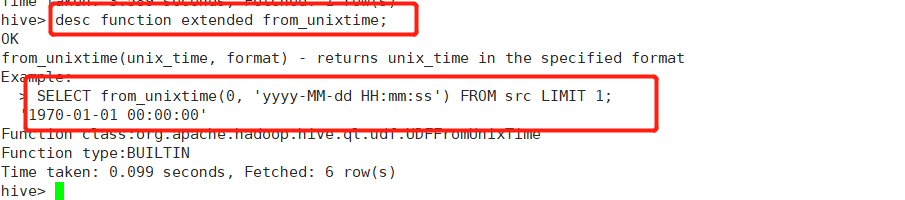
from_unixtime()->时间戳转日期
当前日期


SELECT CURRENT_TIMESTAMP()
-- 返回时间   yyyy-MM-dd HH:mm:ss   2021-08-16 15:24:17            直接拿到的就是gmt+8时间

SELECT unix_timestamp("2021-08-16 15:24:17")
-- 返回秒数  1629098657                          传入gmt+8 返回utc时间戳
SELECT unix_timestamp("2021-08-16 15:24:17","yyyy-MM-dd HH:mm:ss")
-- 返回秒数 1629098657     传入gmt+8 返回utc时间戳

SELECT from_unixtime(1629098657,"yyyy-MM-dd HH:mm:ss")
-- 2021-08-16 15:24:17              传入utc 返回gmt+8

SELECT
from_utc_timestamp(1629098657000,"PRC"),
-- 传入的时间戳为`毫秒`  2021-08-16 23:24:17            传入的时间或时间戳是utc
from_utc_timestamp("2021-08-16 15:24:17","PRC"),
-- 直接传日期 2021-08-16 23:24:17
from_utc_timestamp("2021-08-16 15:24:17","GMT+8"),
-- 直接传日期 2021-08-16 23:24:17
from_utc_timestamp("2021-08-16 15:24:17","UTC"),
-- 直接传日期 2021-08-16 15:24:17
from_utc_timestamp("2021-08-16 15:24:17","GMT")
-- 直接传日期 2021-08-16 15:24:17


SELECT unix_timestamp("1970-01-01 08:00:00")
-- 返回秒数  0                                   传入gmt+8 返回utc时间戳

SELECT from_unixtime(0,"yyyy-MM-dd HH:mm:ss")
-- 1970-01-01 08:00:00                       传入utc 返回gmt+8
常用日期函数
hive默认解析的日期必须是: 2019-11-24 08:09:10
unix_timestamp:返回当前或指定时间的时间戳
from_unixtime:将时间戳转为日期格式
current_date:当前日期
current_timestamp:当前的日期加时间
to_date:抽取日期部分
year:获取年
month:获取月
day:获取日
hour:获取时
minute:获取分
second:获取秒
weekofyear:当前时间是一年中的第几周
dayofmonth:当前时间是一个月中的第几天
months_between: 两个日期间的月份,前-后
add_months:日期加减月
datediff:两个日期相差的天数,前-后
date_add:日期加天数
date_sub:日期减天数
last_day:日期的当月的最后一天
date_format格式化日期 date_format(‘2019-11-24 08:09:10’,’yyyy-MM’) mn
常用取整函数
- round: 四舍五入
- ceil: 向上取整
- floor: 向下取整
常用字符串操作函数
- upper: 转大写
- lower: 转小写
- length: 长度
- trim: 前后去空格
- lpad: 向左补齐,到指定长度
- rpad: 向右补齐,到指定长度
- regexp_replace: SELECT regexp_replace(‘100-200’, ‘(\d+)’, ‘num’) 使用正则表达式匹配目标字符串,匹配成功后替换!
集合操作
- size: 集合(map和list)中元素的个数
- map_keys: 返回map中的key
- map_values: 返回map中的value
- array_contains: 判断array中是否包含某个元素
- sort_array: 将array中的元素排序
常用函数2
NVL(string1,replace_with)
- 判断string1是否为null,如果为null,就替换为replace_with,否则不做操作
- 使用场景
- 将null替换为默认值
- 使用avg()等函数的时候 为null的值不参与总数计算 将其替换为0后就参与计算
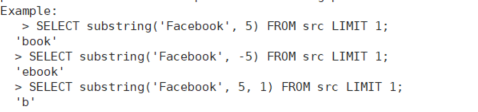
SUBSTRING(str,pos[,len])
截取字符串
CONCAT(str1,str2,….strN)
- 拼接字符串
- 字符串有一个null 返回null
select concat('aaaa','bbbb') ; --aaabbbCONCAT_WS(separator,[string,array(string)]+)
带有分隔符的拼接
select concat_ws('.','www',array('google','com')); -- www.google.com
COLLECT_SET(x)
列转行 一列N行转为一列一行
返回一个集合
集合中元素不重复
结合concat 类似于mysql
SELECT GROUP_CONCAT( DISTINCT a.REGION_ID ORDER BY a.REGION_ID DESC SEPARATOR ' ')
FROM t_region a;
COLLECT_LIST(x)
列转行 一列N行转为一列一行
返回一个list
集合中元素可以重复
结合concat 类似于mysql
SELECT GROUP_CONCAT(a.REGION_ID ORDER BY a.REGION_ID DESC SEPARATOR ' ')
FROM t_region a;
select concat_ws('|',collect_list(REGION_ID)') from t_regionexplode(a)
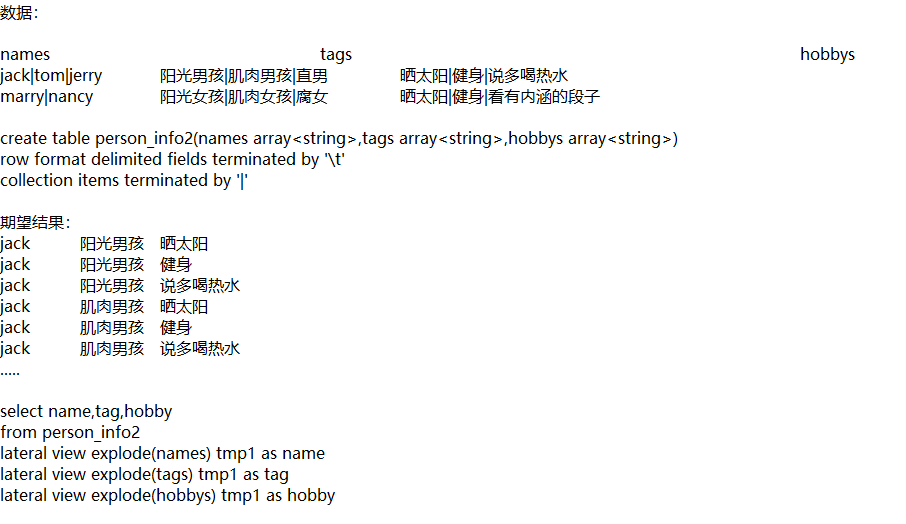
EXPLODE(a) ->UDTF
行转列 一列一行转为 一列多行
参数a只能是array或map
select explode(friends) from peopleUDTF必须紧跟select ,并且不能有其他查询参数,所以做笛卡尔积要用
侧写lateral view
select movie,col1 from movie_info lateral view explode(category) tmp1 as col1用法:LATERAL VIEW udtf(expression) tableAlias AS columnAlias
解释:lateral view用于和split, explode等UDTF一起使用,它能够将一行数据拆成多行数据,在此基础上可以对拆分后的数据进行聚合。
lateral view首先为原始表的每行调用UDTF,UTDF会把一行拆分成一或者多行,lateral view再把结果组合,产生一个支持别名表的虚拟表。
COUNT高级用法
SELECT

    type

  , count(*)

  , count(DISTINCT u)

  , count(CASE WHEN plat=1 THEN u ELSE NULL END)

  , count(DISTINCT CASE WHEN plat=1 THEN u ELSE NULL END)

  , count(CASE WHEN (type=2 OR type=6) THEN u ELSE NULL END)

  , count(DISTINCT CASE WHEN (type=2 OR type=6) THEN u ELSE NULL END)

FROM

    t

WHERE

    dt in ("2012-1-12-02", "2012-1-12-03")

GROUP BY

    type

ORDER BY

    type

;
排序
order by
order by会对输入做全局排序,因此只有一个Reducer(多个Reducer无法保证全局有序),然而只有一个Reducer,会导致当输入规模较大时,消耗较长的计算时间。
sort by
sort by不是全局排序,其在数据进入reducer前完成排序,因此,如果用sort by进行排序,并且设置mapred.reduce.tasks>1,则sort by只会保证每个reducer的输出有序,并不保证全局有序。sort by不同于order by,它不受hive.mapred.mode属性的影响,sort by的数据只能保证在同一个reduce中的数据可以按指定字段排序。使用sort by你可以指定执行的reduce个数(通过set mapred.reduce.tasks=n来指定),对输出的数据再执行归并排序,即可得到全部结果
distribute by
distribute by是控制在map端如何拆分数据给reduce端的。hive会根据distribute by后面列,对应reduce的个数进行分发,默认是采用hash算法。sort by为每个reduce产生一个排序文件。在有些情况下,你需要控制某个特定行应该到哪个reducer,这通常是为了进行后续的聚集操作。distribute by刚好可以做这件事。因此,distribute by经常和sort by配合使用。
distribute by要放在sort by前面
cluster by
cluster by除了具有distribute by的功能外还兼具sort by的功能。但是排序只能是倒叙排序,不能指定排序规则为ASC或者DESC。
cast
select cast(date as datetime) as date from table1;
select cast(date as date) as date from table1;
substr & substring
substr(string A,int start)
substring(string A,int start)
-- 返回字符串A从下标start位置到结尾的字符串

substr(string A,int start,int len)
substring(string A,int start,int len)
-- 返回字符串A从下标start位置开始,长度为len的字符串
coalesce
coalesce (expression_1, expression_2, …,expression_n)
-- 返回第一个不是null的值
coalesce(a,b,c);-- 如果a==null,则选择b;如果b==null,则选择c;如果a!=null,则选择a;如果a b c 都为null ,则返回为null
like
A LIKE B
LIKE(A, B)
 -- 模糊匹配
 -- 如果字符串A或者字符串B为NULL,则返回NULL;如果字符串A符合表达式B的正则语法,则为TRUE;否则为FALSE。B中字符"_"表示任意单个字符,而字符"%"表示任意数量的字符。
 select 'football' like '%ba%'; -- true
 select like('football', '__otba%') -- true
rlike & regexp
A RLIKE B
RLIKE(A, B)
-- 正则匹配
-- 如果字符串A或者字符串B为NULL,则返回NULL;如果字符串A符合JAVA正则表达式B的正则语法,则为TRUE;否则为FALSE。
select 'football' rlike '^footba' -- true
select rlike('football', 'ba') -- true
select 'football' rlike 'ba' -- true

select 'football' regexp '^footba' -- true
select regexp('football', 'ba') -- true
select 'football' regexp 'ba' -- true
regexp_replace
regexp_replace( A,  B,  C)
-- 正则替换
 -- 将字符串A中的符合java正则表达式B的部分替换为C
 select regexp_replace('h234ney', '\\d+', 'o') -- honey
if
if(BOOLEAN testCondition, T valueTrue, T valueFalseOrNull)
-- 条件返回
-- 如果testCondition条件为true,则返回第一个值,否则返回第二个值
select if(1 is null,0,1)  -- 返回1
select if(null is null,0,1) -- 返回0
isnotnull
isnotnull(a)
-- 如果参数a不为null,则返回true,否则返回false

select isnotnull(1) -- 返回true
select isnotnull(null) -- 返回false
isnull
isnull(a)
-- 与isnotnull相反,如果参数a为null,则返回true,否则返回false
select isnull(null) -- 返回true
select isnull(1) -- 返回false
nullif
nullif(a, b)
-- 如果参数a=b,返回null,否则返回a值(Hive2.2.0版本)

select nullif(1,2) -- 返回1
select nullif(1,1) -- 返回null
nvl
nvl(T value, T default_value)
-- 如果value的值为null,则返回default_value默认值,否则返回value的值。在null值判断时,可以使用if函数给定默认值,也可以使用此函数给定默认值,使用该函数sql特别简洁。
select nvl(1,0) -- 返回1
select nvl(null,0) -- 返回0
add_months
add_months(DATE|STRING|TIMESTAMP start_date, INT num_months)
-- 增加月份
-- start_date参数可以是string, date 或者timestamp类型,num_months参数时int类型。返回一个日期,该日期是在start_date基础之上加上num_months个月,即start_date之后num_months个月的一个日期。
-- 注意:如果start_date所在月份的天数大于结果日期月的天数,则返回结果月的最后一天的日期。
select add_months("2020-05-20",2); -- 返回2020-07-20
select add_months("2020-05-20",8); -- 返回2021-01-20
select add_months("2020-05-31",1); -- 返回2020-06-30,5月有31天,6月只有30天,所以返回下一个月的最后一天
current_date
current_date()
-- 返回查询时刻的当前日期
select current_date() -- 返回当前查询日期2020-05-20
current_timestamp
current_timestamp()
-- 返回当前时间戳
select current_timestamp() -- 2020-05-20 14:40:47.273
datediff
datediff(STRING enddate, STRING startdate)
-- 返回相差天数
select datediff("2020-05-20","2020-05-21"); -- 返回-1
select datediff("2020-05-21","2020-05-20"); -- 返回1
date_add & date_sub
date_add(DATE startdate, INT days)
-- 在startdate基础上加上几天,然后返回加上几天之后的一个日期
date_sub(DATE startdate, INT days)
-- 在startdate基础上减去几天,然后返回减去几天之后的一个日期
select date_add("2020-05-20",1); -- 返回2020-05-21,1表示加1天
select date_add("2020-05-20",-1); -- 返回2020-05-19,-1表示减一天
select date_sub("2020-05-20",1); -- 返回2020-05-19,1表示减1天
select date_sub("2020-05-20",-1); -- 返回2020-05-21,-1表示加1天
date_format
date_format(DATE|TIMESTAMP|STRING ts, STRING fmt)
-- 将date/timestamp/string类型的值转换为一个具体格式化的字符串。支持java的SimpleDateFormat格式,第二个参数fmt必须是一个常量
select date_format('2020-05-20', 'yyyy'); -- 返回2020
select date_format('2020-05-20', 'MM'); -- 返回05
select date_format('2020-05-20', 'dd'); -- 返回20
-- 返回2020年05月20日 00时00分00秒
select date_format('2020-05-20', 'yyyy年MM月dd日 HH时mm分ss秒') ;
select date_format('2020-05-20', 'yy/MM/dd') -- 返回 20/05/20
extract
extract(field FROM source)
-- 提取 day, dayofweek, hour, minute, month, quarter, second, week 或者year的值,field可以选择day, dayofweek, hour, minute, month, quarter, second, week 或者year,source必须是一个date、timestamp或者可以转为 date 、timestamp的字符串。注意:Hive 2.2.0版本之后支持该函数

select extract(year from '2020-05-20 15:21:34.467'); -- 返回2020,年
select extract(quarter from '2020-05-20 15:21:34.467'); -- 返回2,季度
select extract(month from '2020-05-20 15:21:34.467'); -- 返回05,月份
select extract(week from '2020-05-20 15:21:34.467'); -- 返回21,同weekofyear,一年中的第几周
select extract(dayofweek from '2020-05-20 15:21:34.467'); -- 返回4,代表星期三
select extract(day from '2020-05-20 15:21:34.467'); -- 返回20,天
select extract(hour from '2020-05-20 15:21:34.467'); -- 返回15,小时
select extract(minute from '2020-05-20 15:21:34.467'); -- 返回21,分钟
select extract(second from '2020-05-20 15:21:34.467'); -- 返回34,秒
year&quarter&month&day&hour&minute&second
select second('2020-05-20 15:21:34'); --返回34trunc
-- 截断日期到指定的日期精度,仅支持月(MONTH/MON/MM)或者年(YEAR/YYYY/YY)
select trunc('2020-05-20', 'YY');   -- 返回2020-01-01,返回年的1月1日
select trunc('2020-05-20', 'MM');   -- 返回2020-05-01,返回月的第一天
select trunc('2020-05-20 15:21:34', 'MM');   -- 返回2020-05-01
next_day
next_day(STRING start_date, STRING day_of_week)
-- 参数start_date可以是一个时间或日期,day_of_week表示星期几,比如Mo表示星期一,Tu表示星期二,Wed表示星期三,Thur表示星期四,Fri表示星期五,Sat表示星期六,Sun表示星期日。如果指定的星期几在该日期所在的周且在该日期之后,则返回当周的星期几日期,如果指定的星期几不在该日期所在的周,则返回下一个星期几对应的日期
select next_day('2020-05-20','Mon');-- 返回当前日期的下一个周一日期:2020-05-25
select next_day('2020-05-20','Tu');-- 返回当前日期的下一个周二日期:2020-05-26
select next_day('2020-05-20','Wed');-- 返回当前日期的下一个周三日期:2020-05-27
-- 2020-05-20为周三,指定的参数为周四,所以返回当周的周四就是2020-05-21
select next_day('2020-05-20','Th');
select next_day('2020-05-20','Fri');-- 返回周五日期2020-05-22
select next_day('2020-05-20','Sat'); -- 返回周六日期2020-05-23
select next_day('2020-05-20','Sun'); -- 返回周六日期2020-05-24
-- 取当前日期所在的周一和周日
select date_add(next_day('2020-05-20','MO'),-7); -- 返回当前日期的周一日期2020-05-18
select date_add(next_day('2020-05-20','MO'),-1); -- 返回当前日期的周日日期2020-05-24