05窗口
窗口
窗口(Window)是处理无界流的关键所在。窗口可以将数据流装入大小有限的“桶”中,再对每个“桶”加以处理。 本文的重心将放在 Flink 如何进行窗口操作以及开发者如何尽可能地利用 Flink 所提供的功能。
keyed window
stream
       .keyBy(...)               <-  仅 keyed 窗口需要
       .window(...)              <-  必填项:"assigner"
      [.trigger(...)]            <-  可选项:"trigger" (省略则使用默认 trigger)
      [.evictor(...)]            <-  可选项:"evictor" (省略则不使用 evictor)
      [.allowedLateness(...)]    <-  可选项:"lateness" (省略则为 0)
      [.sideOutputLateData(...)] <-  可选项:"output tag" (省略则不对迟到数据使用 side output)
       .reduce/aggregate/apply()      <-  必填项:"function"
      [.getSideOutput(...)]      <-  可选项:"output tag"
Non-Keyed Windows
stream
       .windowAll(...)           <-  必填项:"assigner"
      [.trigger(...)]            <-  可选项:"trigger" (else default trigger)
      [.evictor(...)]            <-  可选项:"evictor" (else no evictor)
      [.allowedLateness(...)]    <-  可选项:"lateness" (else zero)
      [.sideOutputLateData(...)] <-  可选项:"output tag" (else no side output for late data)
       .reduce/aggregate/apply()      <-  必填项:"function"
      [.getSideOutput(...)]      <-  可选项:"output tag"
滑动窗口(Sliding Windows)
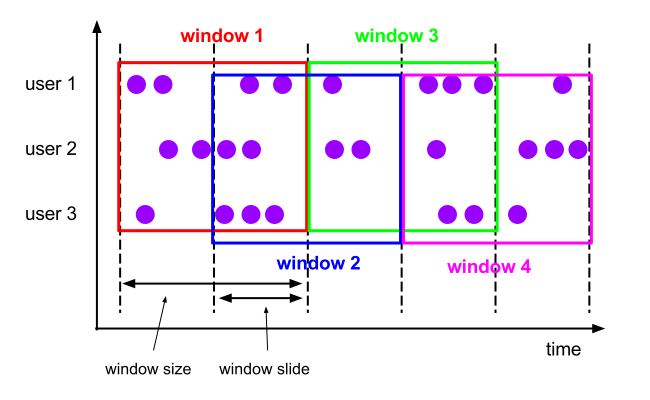
窗口大小通过 window size 参数设置。 滑动窗口需要一个额外的滑动距离(window slide)参数来控制生成新窗口的频率。 因此,如果 slide 小于窗口大小,滑动窗口可以允许窗口重叠。这种情况下,一个元素可能会被分发到多个窗口。
比如说,你设置了大小为 10 分钟,滑动距离 5 分钟的窗口,你会在每 5 分钟得到一个新的窗口, 里面包含之前 10 分钟到达的数据(如下图所示)。
DataStream<T> input = ...;

// 滑动 event-time 窗口
input
    .keyBy(<key selector>)
    .window(SlidingEventTimeWindows.of(Time.seconds(10), Time.seconds(5)))
    .<windowed transformation>(<window function>);

// 滑动 processing-time 窗口
input
    .keyBy(<key selector>)
    .window(SlidingProcessingTimeWindows.of(Time.seconds(10), Time.seconds(5)))
    .<windowed transformation>(<window function>);

// 滑动 processing-time 窗口,偏移量为 -8 小时
input
    .keyBy(<key selector>)
    .window(SlidingProcessingTimeWindows.of(Time.hours(12), Time.hours(1), Time.hours(-8)))
    .<windowed transformation>(<window function>);
滚动窗口(Tumbling Windows)
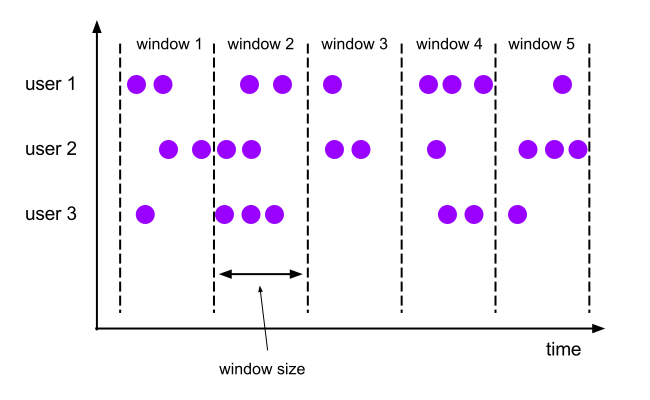
滚动窗口的 assigner 分发元素到指定大小的窗口。滚动窗口的大小是固定的,且各自范围之间不重叠。 比如说,如果你指定了滚动窗口的大小为 5 分钟,那么每 5 分钟就会有一个窗口被计算,且一个新的窗口被创建(如下图所示)。
DataStream<T> input = ...;

// 滚动 event-time 窗口
input
    .keyBy(<key selector>)
    .window(TumblingEventTimeWindows.of(Time.seconds(5)))
    .<windowed transformation>(<window function>);

// 滚动 processing-time 窗口
input
    .keyBy(<key selector>)
    .window(TumblingProcessingTimeWindows.of(Time.seconds(5)))
    .<windowed transformation>(<window function>);

// 长度为一天的滚动 event-time 窗口, 偏移量为 -8 小时。
input
    .keyBy(<key selector>)
    .window(TumblingEventTimeWindows.of(Time.days(1), Time.hours(-8)))
    .<windowed transformation>(<window function>);
滚动窗口的 assigners 也可以传入可选的 offset 参数。这个参数可以用来对齐窗口。 比如说,不设置 offset 时,长度为一小时、滑动距离为 30 分钟的滑动窗口会与 linux 的 epoch 对齐。 你会得到如 1:00:00.000 - 1:59:59.999, 1:30:00.000 - 2:29:59.999 等。 如果你想改变对齐方式,你可以设置一个 offset。 如果设置了 15 分钟的 offset,你会得到 1:15:00.000 - 2:14:59.999、1:45:00.000 - 2:44:59.999 等。 一个重要的 offset 用例是根据 UTC-0 调整窗口的时差。比如说,在中国你可能会设置 offset 为 Time.hours(-8)。
会话窗口
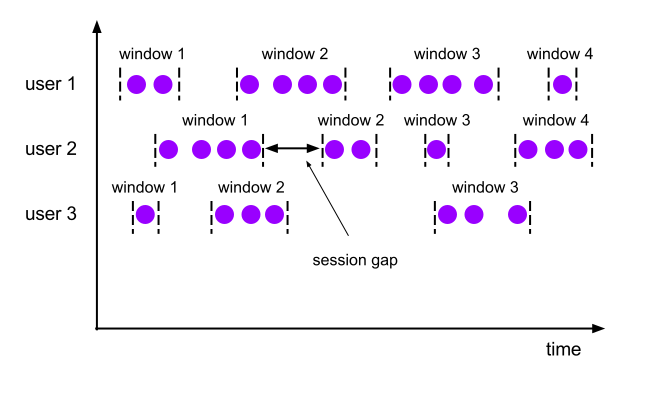
会话窗口不会相互重叠,且没有固定的开始或结束时间。 会话窗口在一段时间没有收到数据之后会关闭,即在一段不活跃的间隔之后。 会话窗口的 assigner 可以设置固定的会话间隔(session gap)或 用 session gap extractor 函数来动态地定义多长时间算作不活跃。 当超出了不活跃的时间段,当前的会话就会关闭,并且将接下来的数据分发到新的会话窗口。
DataStream<T> input = ...;

// 设置了固定间隔的 event-time 会话窗口
input
    .keyBy(<key selector>)
    .window(EventTimeSessionWindows.withGap(Time.minutes(10)))
    .<windowed transformation>(<window function>);

// 设置了动态间隔的 event-time 会话窗口
input
    .keyBy(<key selector>)
    .window(EventTimeSessionWindows.withDynamicGap((element) -> {
        // 决定并返回会话间隔
    }))
    .<windowed transformation>(<window function>);

// 设置了固定间隔的 processing-time session 窗口
input
    .keyBy(<key selector>)
    .window(ProcessingTimeSessionWindows.withGap(Time.minutes(10)))
    .<windowed transformation>(<window function>);

// 设置了动态间隔的 processing-time 会话窗口
input
    .keyBy(<key selector>)
    .window(ProcessingTimeSessionWindows.withDynamicGap((element) -> {
        // 决定并返回会话间隔
    }))
    .<windowed transformation>(<window function>);
窗口生命周期
一个窗口在第一个属于它的元素到达时就会被创建,然后在时间(event 或 processing time) 超过窗口的“结束时间戳 + 用户定义的 allowed lateness ”时 被完全删除。Flink 仅保证删除基于时间的窗口,其他类型的窗口不做保证, 比如全局窗口。
每个窗口都有一个触发器(trigger)和一个函数(function)
该 function 决定如何计算窗口中的内容, 而 Trigger 决定何时窗口中的数据可以被 function 计算。 Trigger 的触发(fire)条件可能是“当窗口中有多于 4 条数据”或“当 watermark 越过窗口的结束时间”等。 Trigger 还可以在 window 被创建后、删除前的这段时间内定义何时清理(purge)窗口中的数据。 这里的数据仅指窗口内的元素,不包括窗口的 meta data。也就是说,窗口在 purge 后仍然可以加入新的数据。
窗口函数
窗口函数有三种:ReduceFunction、AggregateFunction 或 ProcessWindowFunction。 前两者执行起来更高效,因为 Flink 可以在每条数据到达窗口后 进行增量聚合(incrementally aggregate)。 而 ProcessWindowFunction 会得到能够遍历当前窗口内所有数据的 Iterable,以及关于这个窗口的 meta-information。
使用 ProcessWindowFunction 的窗口转换操作没有其他两种函数高效,因为 Flink 在窗口触发前必须缓存里面的所有数据。 ProcessWindowFunction 可以与 ReduceFunction 或 AggregateFunction 合并来提高效率。 这样做既可以增量聚合窗口内的数据,又可以从 ProcessWindowFunction 接收窗口的 metadata。
ReduceFunction
ReduceFunction 指定两条输入数据如何合并起来产生一条输出数据,输入和输出数据的类型必须相同。 Flink 使用 ReduceFunction 对窗口中的数据进行增量聚合。
DataStream<Tuple2<String, Long>> input = ...;

input
    .keyBy(<key selector>)
    .window(<window assigner>)
    .reduce(new ReduceFunction<Tuple2<String, Long>>() {
      public Tuple2<String, Long> reduce(Tuple2<String, Long> v1, Tuple2<String, Long> v2) {
        return new Tuple2<>(v1.f0, v1.f1 + v2.f1);
      }
    });
AggregateFunction
ReduceFunction 是 AggregateFunction 的特殊情况。 AggregateFunction 接收三个类型:输入数据的类型(IN)、累加器的类型(ACC)和输出数据的类型(OUT)。 输入数据的类型是输入流的元素类型,AggregateFunction 接口有如下几个方法: 把每一条元素加进累加器、创建初始累加器、合并两个累加器、从累加器中提取输出(OUT 类型)。我们通过下例说明。
与 ReduceFunction 相同,Flink 会在输入数据到达窗口时直接进行增量聚合。
/**
 * The accumulator is used to keep a running sum and a count. The {@code getResult} method
 * computes the average.
 */
private static class AverageAggregate
    implements AggregateFunction<Tuple2<String, Long>, Tuple2<Long, Long>, Double> {
  @Override
  public Tuple2<Long, Long> createAccumulator() {
    return new Tuple2<>(0L, 0L);
  }

  @Override
  public Tuple2<Long, Long> add(Tuple2<String, Long> value, Tuple2<Long, Long> accumulator) {
    return new Tuple2<>(accumulator.f0 + value.f1, accumulator.f1 + 1L);
  }

  @Override
  public Double getResult(Tuple2<Long, Long> accumulator) {
    return ((double) accumulator.f0) / accumulator.f1;
  }

  @Override
  public Tuple2<Long, Long> merge(Tuple2<Long, Long> a, Tuple2<Long, Long> b) {
    return new Tuple2<>(a.f0 + b.f0, a.f1 + b.f1);
  }
}

DataStream<Tuple2<String, Long>> input = ...;

input
    .keyBy(<key selector>)
    .window(<window assigner>)
    .aggregate(new AverageAggregate());
ProcessWindowFunction
ProcessWindowFunction 有能获取包含窗口内所有元素的 Iterable, 以及用来获取时间和状态信息的 Context 对象,比其他窗口函数更加灵活。 ProcessWindowFunction 的灵活性是以性能和资源消耗为代价的, 因为窗口中的数据无法被增量聚合,而需要在窗口触发前缓存所有数据。
public abstract class ProcessWindowFunction<IN, OUT, KEY, W extends Window> implements Function {

    /**
     * Evaluates the window and outputs none or several elements.
     *
     * @param key The key for which this window is evaluated.
     * @param context The context in which the window is being evaluated.
     * @param elements The elements in the window being evaluated.
     * @param out A collector for emitting elements.
     *
     * @throws Exception The function may throw exceptions to fail the program and trigger recovery.
     */
    public abstract void process(
            KEY key,
            Context context,
            Iterable<IN> elements,
            Collector<OUT> out) throws Exception;

   	/**
   	 * The context holding window metadata.
   	 */
   	public abstract class Context implements java.io.Serializable {
   	    /**
   	     * Returns the window that is being evaluated.
   	     */
   	    public abstract W window();

   	    /** Returns the current processing time. */
   	    public abstract long currentProcessingTime();

   	    /** Returns the current event-time watermark. */
   	    public abstract long currentWatermark();

   	    /**
   	     * State accessor for per-key and per-window state.
   	     *
   	     * <p><b>NOTE:</b>If you use per-window state you have to ensure that you clean it up
   	     * by implementing {@link ProcessWindowFunction#clear(Context)}.
   	     */
   	    public abstract KeyedStateStore windowState();

   	    /**
   	     * State accessor for per-key global state.
   	     */
   	    public abstract KeyedStateStore globalState();
   	}

}
DataStream<Tuple2<String, Long>> input = ...;
input
.keyBy(t -> t.f0)
.window(TumblingEventTimeWindows.of(Time.minutes(5)))
.process(new MyProcessWindowFunction());
/* ... */
public class MyProcessWindowFunction
extends ProcessWindowFunction<Tuple2<String, Long>, String, String, TimeWindow> {
@Override
public void process(String key, Context context, Iterable<Tuple2<String, Long>> input, Collector<String> out) {
long count = 0;
for (Tuple2<String, Long> in: input) {
count++;
}
out.collect("Window: " + context.window() + "count: " + count);
}
}增量聚合的 ProcessWindowFunction
使用 ProcessWindowFunction 完成简单的聚合任务是非常低效的
ProcessWindowFunction 可以与 ReduceFunction 或 AggregateFunction 搭配使用, 使其能够在数据到达窗口的时候进行增量聚合。当窗口关闭时,ProcessWindowFunction 将会得到聚合的结果。 这样它就可以增量聚合窗口的元素并且从 ProcessWindowFunction` 中获得窗口的元数据。
DataStream<SensorReading> input = ...;

input
  .keyBy(<key selector>)
  .window(<window assigner>)
  .reduce(new MyReduceFunction(), new MyProcessWindowFunction());

// Function definitions

private static class MyReduceFunction implements ReduceFunction<SensorReading> {

  public SensorReading reduce(SensorReading r1, SensorReading r2) {
      return r1.value() > r2.value() ? r2 : r1;
  }
}

private static class MyProcessWindowFunction
    extends ProcessWindowFunction<SensorReading, Tuple2<Long, SensorReading>, String, TimeWindow> {

  public void process(String key,
                    Context context,
                    Iterable<SensorReading> minReadings,
                    Collector<Tuple2<Long, SensorReading>> out) {
      SensorReading min = minReadings.iterator().next();
      out.collect(new Tuple2<Long, SensorReading>(context.window().getStart(), min));
  }
}
DataStream<Tuple2<String, Long>> input = ...;
input
.keyBy(<key selector>)
.window(<window assigner>)
.aggregate(new AverageAggregate(), new MyProcessWindowFunction());
// Function definitions
/**
* The accumulator is used to keep a running sum and a count. The {@code getResult} method
* computes the average.
*/
private static class AverageAggregate
implements AggregateFunction<Tuple2<String, Long>, Tuple2<Long, Long>, Double> {
@Override
public Tuple2<Long, Long> createAccumulator() {
return new Tuple2<>(0L, 0L);
}
@Override
public Tuple2<Long, Long> add(Tuple2<String, Long> value, Tuple2<Long, Long> accumulator) {
return new Tuple2<>(accumulator.f0 + value.f1, accumulator.f1 + 1L);
}
@Override
public Double getResult(Tuple2<Long, Long> accumulator) {
return ((double) accumulator.f0) / accumulator.f1;
}
@Override
public Tuple2<Long, Long> merge(Tuple2<Long, Long> a, Tuple2<Long, Long> b) {
return new Tuple2<>(a.f0 + b.f0, a.f1 + b.f1);
}
}
private static class MyProcessWindowFunction
extends ProcessWindowFunction<Double, Tuple2<String, Double>, String, TimeWindow> {
public void process(String key,
Context context,
Iterable<Double> averages,
Collector<Tuple2<String, Double>> out) {
Double average = averages.iterator().next();
out.collect(new Tuple2<>(key, average));
}
}在 ProcessWindowFunction 中使用 per-window state
除了访问 keyed state (任何富函数都可以),ProcessWindowFunction 还可以使用作用域仅为 “当前正在处理的窗口”的 keyed state。在这种情况下,理解 per-window 中的 window 指的是什么非常重要。 总共有以下几种窗口的理解:
- 在窗口操作中定义的窗口:比如定义了长一小时的滚动窗口或长两小时、滑动一小时的滑动窗口。
- 对应某个 key 的窗口实例:比如 以 user-id xyz 为 key,从 12:00 到 13:00 的时间窗口。 具体情况取决于窗口的定义,根据具体的 key 和时间段会产生诸多不同的窗口实例。
Per-window state 作用于后者。也就是说,如果我们处理有 1000 种不同 key 的事件, 并且目前所有事件都处于 [12:00, 13:00) 时间窗口内,那么我们将会得到 1000 个窗口实例, 且每个实例都有自己的 keyed per-window state。
process() 接收到的 Context 对象中有两个方法允许我们访问以下两种 state:
globalState(),访问全局的 keyed statewindowState(), 访问作用域仅限于当前窗口的 keyed state
如果你可能将一个 window 触发多次(比如当你的迟到数据会再次触发窗口计算, 或你自定义了根据推测提前触发窗口的 trigger),那么这个功能将非常有用。 这时你可能需要在 per-window state 中储存关于之前触发的信息或触发的总次数。
当使用窗口状态时,一定记得在删除窗口时清除这些状态。他们应该定义在 clear() 方法中。
触发器
Trigger 决定了一个窗口(由 window assigner 定义)何时可以被 window function 处理。 每个 WindowAssigner 都有一个默认的 Trigger。 如果默认 trigger 无法满足你的需要,你可以在 trigger(...) 调用中指定自定义的 trigger。
Trigger 接口提供了五个方法来响应不同的事件:
onElement()方法在每个元素被加入窗口时调用。onEventTime()方法在注册的 event-time timer 触发时调用。onProcessingTime()方法在注册的 processing-time timer 触发时调用。onMerge()方法与有状态的 trigger 相关。该方法会在两个窗口合并时, 将窗口对应 trigger 的状态进行合并,比如使用会话窗口时。- 最后,
clear()方法处理在对应窗口被移除时所需的逻辑。
有两点需要注意:
- 前三个方法通过返回
TriggerResult来决定 trigger 如何应对到达窗口的事件。应对方案有以下几种:
CONTINUE: 什么也不做FIRE: 触发计算PURGE: 清空窗口内的元素FIRE_AND_PURGE: 触发计算,计算结束后清空窗口内的元素
触发(Fire)与清除(Purge)
当 trigger 认定一个窗口可以被计算时,它就会触发,也就是返回 FIRE 或 FIRE_AND_PURGE。 这是让窗口算子发送当前窗口计算结果的信号。 如果一个窗口指定了 ProcessWindowFunction,所有的元素都会传给 ProcessWindowFunction。 如果是 ReduceFunction 或 AggregateFunction,则直接发送聚合的结果。
当 trigger 触发时,它可以返回 FIRE 或 FIRE_AND_PURGE。 FIRE 会保留被触发的窗口中的内容,而 FIRE_AND_PURGE 会删除这些内容。 Flink 内置的 trigger 默认使用 FIRE,不会清除窗口的状态。
移除器
Flink 的窗口模型允许在 WindowAssigner 和 Trigger 之外指定可选的 Evictor。 通过 evictor(...) 方法传入 Evictor。 Evictor 可以在 trigger 触发后、调用窗口函数之前或之后从窗口中删除元素。
/**
 * Optionally evicts elements. Called before windowing function.
 *
 * @param elements The elements currently in the pane.
 * @param size The current number of elements in the pane.
 * @param window The {@link Window}
 * @param evictorContext The context for the Evictor
 */
void evictBefore(Iterable<TimestampedValue<T>> elements, int size, W window, EvictorContext evictorContext);

/**
 * Optionally evicts elements. Called after windowing function.
 *
 * @param elements The elements currently in the pane.
 * @param size The current number of elements in the pane.
 * @param window The {@link Window}
 * @param evictorContext The context for the Evictor
 */
void evictAfter(Iterable<TimestampedValue<T>> elements, int size, W window, EvictorContext evictorContext);
evictBefore() 包含在调用窗口函数前的逻辑,而 evictAfter() 包含在窗口函数调用之后的逻辑。 在调用窗口函数之前被移除的元素不会被窗口函数计算。
Allowed Lateness
在使用 event-time 窗口时,数据可能会迟到,即 Flink 用来追踪 event-time 进展的 watermark 已经 越过了窗口结束的 timestamp 后,数据才到达。
默认情况下,watermark 一旦越过窗口结束的 timestamp,迟到的数据就会被直接丢弃。 但是 Flink 允许指定窗口算子最大的 allowed lateness。 Allowed lateness 定义了一个元素可以在迟到多长时间的情况下不被丢弃,这个参数默认是 0。 在 watermark 超过窗口末端、到达窗口末端加上 allowed lateness 之前的这段时间内到达的元素, 依旧会被加入窗口。取决于窗口的 trigger,一个迟到但没有被丢弃的元素可能会再次触发窗口,比如 EventTimeTrigger。
为了实现这个功能,Flink 会将窗口状态保存到 allowed lateness 超时才会将窗口及其状态删除
默认情况下,allowed lateness 被设为 0。即 watermark 之后到达的元素会被丢弃。
DataStream<T> input = ...;

input
    .keyBy(<key selector>)
    .window(<window assigner>)
    .allowedLateness(<time>)
    .<windowed transformation>(<window function>);
从旁路输出(side output)获取迟到数据
通过 Flink 的 旁路输出功能,你可以获得迟到数据的数据流。
首先,你需要在开窗后的 stream 上使用 sideOutputLateData(OutputTag) 表明你需要获取迟到数据。 然后,你就可以从窗口操作的结果中获取旁路输出流了。
final OutputTag<T> lateOutputTag = new OutputTag<T>("late-data"){};

DataStream<T> input = ...;

SingleOutputStreamOperator<T> result = input
    .keyBy(<key selector>)
    .window(<window assigner>)
    .allowedLateness(<time>)
    .sideOutputLateData(lateOutputTag)
    .<windowed transformation>(<window function>);

DataStream<T> lateStream = result.getSideOutput(lateOutputTag);
关于状态大小的考量
窗口可以被定义在很长的时间段上(比如几天、几周或几个月)并且积累下很大的状态。 当你估算窗口计算的储存需求时,可以铭记几条规则:
- Flink 会为一个元素在它所属的每一个窗口中都创建一个副本。 因此,一个元素在滚动窗口的设置中只会存在一个副本(一个元素仅属于一个窗口,除非它迟到了)。 与之相反,一个元素可能会被拷贝到多个滑动窗口中 因此,设置一个大小为一天、滑动距离为一秒的滑动窗口可能不是个好想法。
ReduceFunction和AggregateFunction可以极大地减少储存需求,因为他们会就地聚合到达的元素, 且每个窗口仅储存一个值。而使用ProcessWindowFunction需要累积窗口中所有的元素。- 使用
Evictor可以避免预聚合, 因为窗口中的所有数据必须先经过 evictor 才能进行计算。