08MCP
本文最后更新于 2026-01-13 10:37:54
MCP(Model Context Protocol)
MCP Client
负责建立和管理与MCP服务器的连接。它实现了协议的客户端
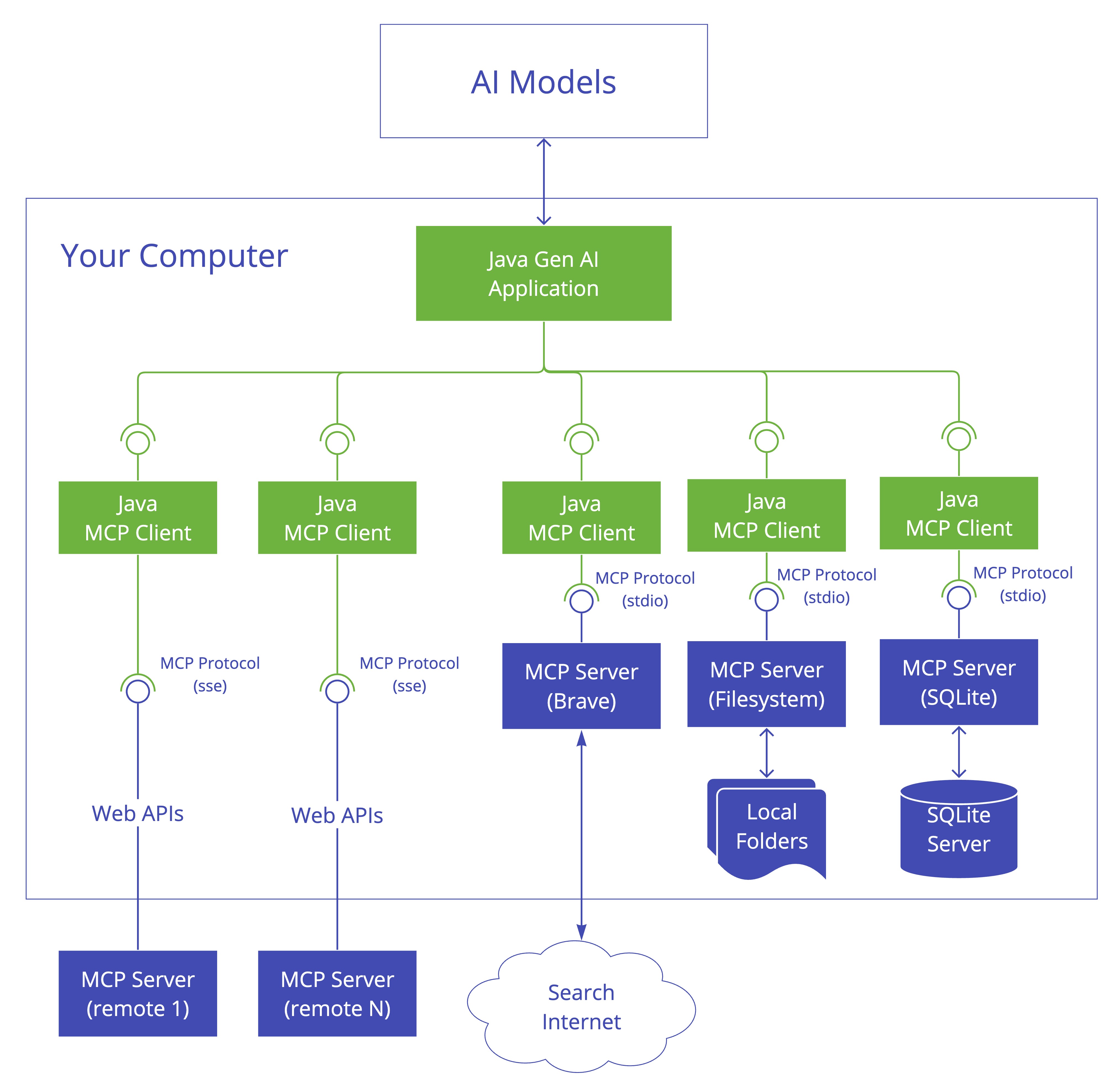
MCP Server
客户端提供工具、资源和功能
Spring AI MCP 集成
Client Starters
spring-ai-starter-mcp-client- Core starter providing STDIO and HTTP-based SSE supportspring-ai-starter-mcp-client-webflux- WebFlux-based SSE transport implementation
标准启动器通过STDIO(进程内)和/或SSE(远程)传输同时连接到一个或多个MCP服务器。SSE连接使用基于httpclient的传输实现。
每个到MCP服务器的连接都会创建一个新的MCP客户端实例。
您可以选择同步或异步MCP客户端(注意:不能混合同步和异步客户端)。
对于生产部署,我们建议使用基于webflux的SSE连接。
配置参数
spring.ai.mcp.client
| 参数 | 描述 | 默认值 |
|---|---|---|
| enable | 是否启用MCP client | True |
| name | mcp client实例名称 | spring-ai-mcp-client |
| version | mcp client实例版本 | 1.0.0 |
| initialized | 是否创建时初始化 | true |
| request-timeout | 客户端请求超时时间 | 20s |
| type | 客户端类型(SYNC或ASYNC)。不支持混合 | SYNC |
| root-change-notification | 根上下文变更通知 | true |
| toolcallback.enabled | MCP工具回调与Spring AI的工具执行框架的集成 | true |
Client Starter Stdio
spring.ai.mcp.client.stdio
| 参数 | 描述 | 默认值 |
|---|---|---|
| servers-configuration | JSON格式的MCP服务器配置 | - |
| connections | stdio 连接配置 | |
| connections.[name].command | 命令 | |
| connections.[name].args | 参数 | |
| connections.[name].env | 环境变量 |
connections在yaml中直接配置
spring:
  ai:
    mcp:
      client:
        stdio:
          root-change-notification: true
          connections:
            server1:
              command: /path/to/server
              args:
                - --port=8080
                - --mode=production
              env:
                API_KEY: your-api-key
                DEBUG: "true"
servers-configuration 配置文件方式
spring:
  ai:
    mcp:
      client:
        stdio:
          servers-configuration: classpath:mcp-servers.json
{
"mcpServers": {
"filesystem": {
"command": "npx",
"args": [
"-y",
"@modelcontextprotocol/server-filesystem",
"/Users/username/Desktop",
"/Users/username/Downloads"
]
}
}
}Client Starter Sse
spring.ai.mcp.client.sse
| 参数 | 描述 | 默认值 |
|---|---|---|
| connections | SSE连接配置 | - |
| connections.[name].url | - | |
| connections.[name].sse-endpoint | /sse |
spring:
  ai:
    mcp:
      client:
        sse:
          connections:
            server1:
              url: http://localhost:8080
            server2:
              url: http://otherserver:8081
              sse-endpoint: /custom-sse
Client Starter Streamable-HTTP
spring.ai.mcp.client.streamable-http
| 参数 | 描述 | 默认值 |
|---|---|---|
| connections | SSE连接配置 | - |
| connections.[name].url | - | |
| connections.[name].sse-endpoint | /mcp |
Client Annoations
spring.ai.mcp.client.annotation-scanner.enabled default true
- @McpLogging - MCP server 返回的日志
- @McpSampling - 处理MCP server 对 大模型的请求
- @McpElicitation - 调用MCP前, 追问/向用户补充信息
- @McpProgress - MCP处理进度
- @McpToolListChanged - Handles notifications when the server’s tool list changes
- @McpResourceListChanged - Handles notifications when the server’s resource list changes
- @McpPromptListChanged - Handles notifications when the server’s prompt list changes
@Component
public class McpClientHandlers {

  // 来自mcp服务端生成的日志
  @McpLogging(clients = "server1")
  public void handleLoggingMessage(LoggingMessageNotification notification) {
    System.out.println("Received log: " + notification.level() +
                       " - " + notification.data());
  }

  // 来自 mcp服务端的调用大模型请求
  @McpSampling(clients = "server1")
  public CreateMessageResult handleSamplingRequest(CreateMessageRequest request) {
    // Process the request and generate a response
    String response = generateLLMResponse(request);

    return CreateMessageResult.builder()
      .role(Role.ASSISTANT)
      .content(new TextContent(response))
      .model("gpt-4")
      .build();
  }

  // 来自mcp服务端的处理进度
  @McpProgress(clients = "server1")
  public void handleProgressNotification(ProgressNotification notification) {
    double percentage = notification.progress() * 100;
    System.out.println(String.format("Progress: %.2f%% - %s",
                                     percentage, notification.message()));
  }

  @McpToolListChanged(clients = "server1")
  public void handleToolListChanged(List<McpSchema.Tool> updatedTools) {
    System.out.println("Tool list updated: " + updatedTools.size() + " tools available");
    // Update local tool registry
    toolRegistry.updateTools(updatedTools);
  }
}
@McpElicitation(clients = "interactive-server")
public ElicitResult handleInteractiveElicitation(ElicitRequest request) {
Map<String, Object> schema = request.requestedSchema();
Map<String, Object> userData = new HashMap<>();
// Check what information is being requested
if (schema != null && schema.containsKey("properties")) {
Map<String, Object> properties = (Map<String, Object>) schema.get("properties");
// Gather user input based on schema
if (properties.containsKey("name")) {
userData.put("name", promptUser("Enter your name:"));
}
if (properties.containsKey("email")) {
userData.put("email", promptUser("Enter your email:"));
}
if (properties.containsKey("preferences")) {
userData.put("preferences", gatherPreferences());
}
}
return new ElicitResult(ElicitResult.Action.ACCEPT, userData);
}
@McpElicitation(clients = "interactive-server")
public Mono<ElicitResult> handleAsyncElicitation(ElicitRequest request) {
return Mono.fromCallable(() -> {
// Async user interaction
Map<String, Object> userData = asyncGatherUserInput(request);
return new ElicitResult(ElicitResult.Action.ACCEPT, userData);
}).timeout(Duration.ofSeconds(30))
.onErrorReturn(new ElicitResult(ElicitResult.Action.CANCEL, null));
}
ClientCustomizer
@Component
public class CustomMcpSyncClientCustomizer implements McpSyncClientCustomizer {
    @Override
    public void customize(String serverConfigurationName, McpClient.SyncSpec spec) {

        // Customize the request timeout configuration
        spec.requestTimeout(Duration.ofSeconds(30));

        // Sets the root URIs that this client can access.
        spec.roots(roots);

        // Sets a custom sampling handler for processing message creation requests.
        spec.sampling((CreateMessageRequest messageRequest) -> {
            // Handle sampling
            CreateMessageResult result = ...
            return result;
        });

        // Sets a custom elicitation handler for processing elicitation requests.
        spec.elicitation((ElicitRequest request) -> {
          // handle elicitation
          return new ElicitResult(ElicitResult.Action.ACCEPT, Map.of("message", request.message()));
        });

        // Adds a consumer to be notified when progress notifications are received.
        spec.progressConsumer((ProgressNotification progress) -> {
         // Handle progress notifications
        });

        // Adds a consumer to be notified when the available tools change, such as tools
        // being added or removed.
        spec.toolsChangeConsumer((List<McpSchema.Tool> tools) -> {
            // Handle tools change
        });

        // Adds a consumer to be notified when the available resources change, such as resources
        // being added or removed.
        spec.resourcesChangeConsumer((List<McpSchema.Resource> resources) -> {
            // Handle resources change
        });

        // Adds a consumer to be notified when the available prompts change, such as prompts
        // being added or removed.
        spec.promptsChangeConsumer((List<McpSchema.Prompt> prompts) -> {
            // Handle prompts change
        });

        // Adds a consumer to be notified when logging messages are received from the server.
        spec.loggingConsumer((McpSchema.LoggingMessageNotification log) -> {
            // Handle log messages
        });
    }
}


// ASYNC
@Component
public class CustomMcpAsyncClientCustomizer implements McpAsyncClientCustomizer {
    @Override
    public void customize(String serverConfigurationName, McpClient.AsyncSpec spec) {
        // Customize the async client configuration
        spec.requestTimeout(Duration.ofSeconds(30));
    }
}
Client Tool Filtering
@Component
public class CustomMcpToolFilter implements McpToolFilter {

    @Override
    public boolean test(McpConnectionInfo connectionInfo, McpSchema.Tool tool) {
        // Filter logic based on connection information and tool properties
        // Return true to include the tool, false to exclude it

        // Example: Exclude tools from a specific client
        if (connectionInfo.clientInfo().name().equals("restricted-client")) {
            return false;
        }

        // Example: Only include tools with specific names
        if (tool.name().startsWith("allowed_")) {
            return true;
        }

        // Example: Filter based on tool description or other properties
        if (tool.description() != null &&
            tool.description().contains("experimental")) {
            return false;
        }

        return true; // Include all other tools by default
    }
}
Client MCP Meta Converter
ChatModel chatModel = ...

String response = ChatClient.create(chatModel)
        .prompt("Tell me more about the customer with ID 42")
        .toolContext(Map.of("progressToken", "my-progress-token"))
        .call()
        .content();
如果没有提供自定义转换器bean,启动器使用ToolContextToMcpMetaConverter.defaultConverter()
过滤MCP交换密钥(McpToolUtils)。TOOL_CONTEXT_MCP_EXCHANGE_KEY)
过滤掉带有空值的条目
作为元数据传递所有其他上下文条目
@Component
public class CustomToolContextToMcpMetaConverter implements ToolContextToMcpMetaConverter {

    @Override
    public Map<String, Object> convert(ToolContext toolContext) {
        if (toolContext == null || toolContext.getContext() == null) {
            return Map.of();
        }

        // Custom logic to convert tool context to MCP metadata
        Map<String, Object> metadata = new HashMap<>();

        // Example: Add custom prefix to all keys
        for (Map.Entry<String, Object> entry : toolContext.getContext().entrySet()) {
            if (entry.getValue() != null) {
                metadata.put("app_" + entry.getKey(), entry.getValue());
            }
        }

        // Example: Add additional metadata
        metadata.put("timestamp", System.currentTimeMillis());
        metadata.put("source", "spring-ai");

        return metadata;
    }
}
自动注入
@Autowired
private List<McpSyncClient> mcpSyncClients;  // For sync client

// OR

@Autowired
private List<McpAsyncClient> mcpAsyncClients;  // For async client
当工具回调被启用时(spring.ai.mcp.client.toolcallback.enable),所有MCP客户端的注册MCP工具将作为ToolCallbackProvider实例提供
@Autowired
private SyncMcpToolCallbackProvider toolCallbackProvider;
ToolCallback[] toolCallbacks = toolCallbackProvider.getToolCallbacks();
Server Starters
spring-ai-starter-mcp-server- Core server with STDIO transport supportspring-ai-starter-mcp-server-webmvc- Spring MVC-based SSE transport implementationspring-ai-starter-mcp-server-webflux- WebFlux-based SSE transport implementationspring-ai-starter-mcp-server-webmvc+spring.ai.mcp.server.protocol =STREAMABLEStreamable-HTTPspring-ai-starter-mcp-server-webflux+spring.ai.mcp.server.protocol =STREAMABLEStreamable-HTTPspring-ai-starter-mcp-server-webmvc+spring.ai.mcp.server.protocol =STATELESSStateless Streamable-HTTPspring-ai-starter-mcp-server-webflux+spring.ai.mcp.server.protocol =STATELESSStateless Streamable-HTTP
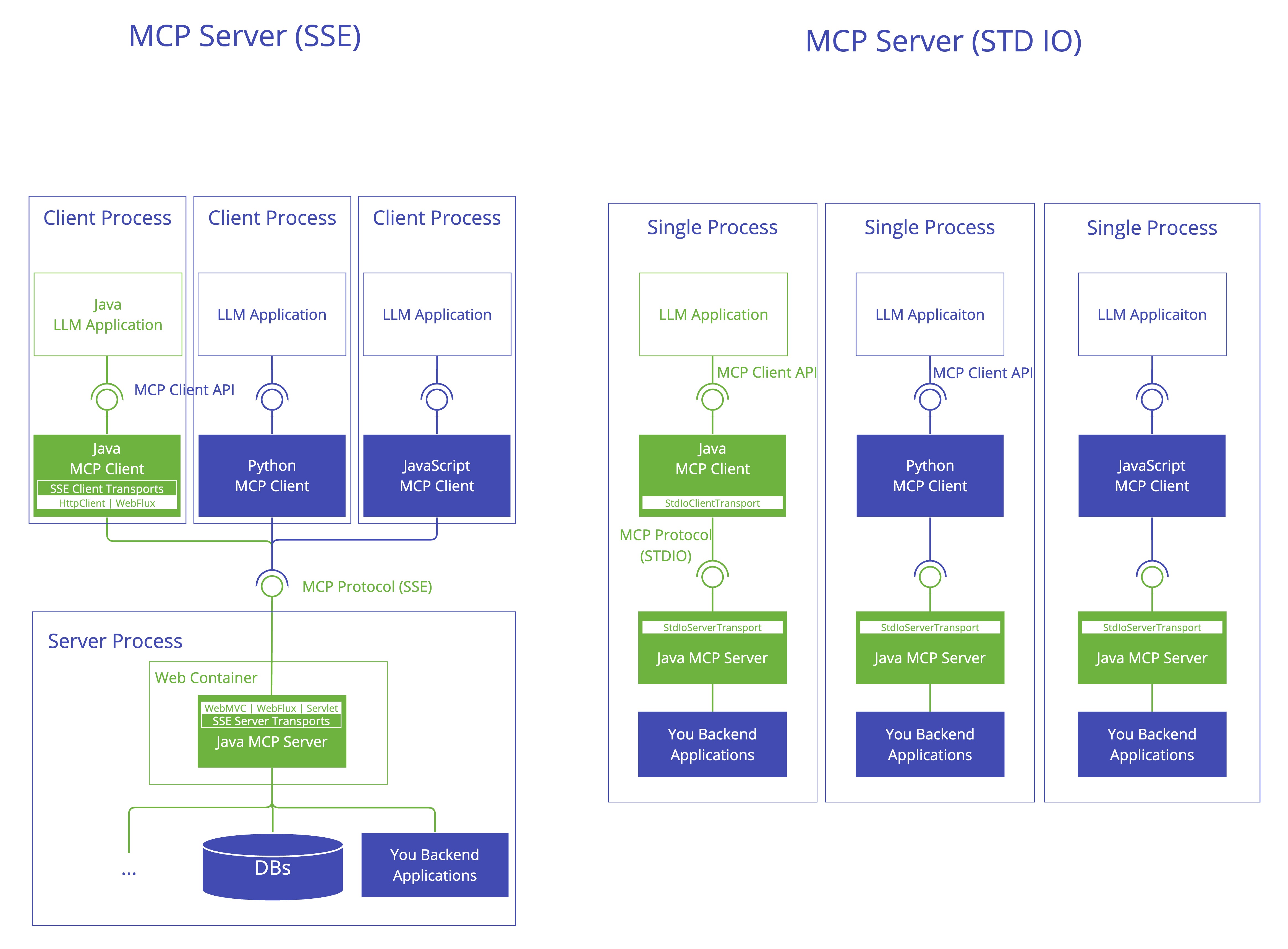
STDIO:本地进程通信的简单方案
描述:STDIO 协议是 Spring AI MCP Server 最基础的传输实现,它基于标准输入/输出流进行通信,无需网络协议支持。在技术实现上,客户端直接启动并管理服务器进程,通过向服务器标准输入(stdin)写入消息,从标准输出(stdout)读取消息完成交互
优势:
- 简单和安全性:数据传输完全在进程内存中进行,避免了网络传输的安全风险
- 无需网络配置:开发者只需通过命令行启动服务进程即可开始通信
- 低延迟低场景:适合需要快速响应的本地工具调用
劣势:
- 仅支持本地通信:无法跨网络或分布式环境使用
- 并发处理限制:采用同步机制,单线程处理请求,难以应对高并发场景
- 资源管理问题:每次请求都需要重建连接,无法有效复用资源
SSE:传统 HTTP 流式传输的单向方案
描述:SSE 协议是 Spring AI 早期版本中主流的远程传输方案,基于 HTML5 标准的服务器发送事件技术。在 Spring AI 框架中,SSE 分为两种实现方式:WebMVC 模式(基于 Servlet API)和 WebFlux 模式(基于响应式编程)
特点:服务器向客户端单向推送数据,允许服务器在建立连接后随时发送实时更新,无需客户端反复发起请求
优势:
- 实时推送能力:支持长连接保持,适合需要持续更新的场景
- 实现复杂度低:客户端只需通过浏览器原生支持的 EventSource 对象即可实现连接
- 传统环境集成方便:适合与现有 Spring MVC 项目无缝衔接
劣势:
- 高并发资源消耗:每个连接需占用约 80KB 内存,万级并发时可能导致服务器资源耗尽
- 连接稳定性差:在弱网环境下中断率高达 15%-30%,且不支持断线自动恢复
- 架构扩展性限制:强制要求服务器维护粘性会话,在负载均衡场景下增加了配置复杂度
Streamable HTTP:平衡性能与状态的创新方案
描述 Streamable HTTP 协议是 MCP 协议在 2025 年 3 月的重大升级,它取代了原有的 HTTP+SSE 作为默认传输方式。Streamable HTTP 的核心创新在于统一了请求/响应端点,支持按需流式传输和会话管理,同时保留了 HTTP 协议的简洁性
特点:在高并发场景下,TCP 连接数仅为几十条,远低于 SSE 的上千条,显著降低了服务器资源压力。响应时间方面,Streamable HTTP 在 1000 并发用户测试中平均响应时间为 7.5ms,而 SSE 飙升至 1511ms,性能提升近 200 倍
Stateless Streamable HTTP:无状态设计的极致优化
描述:Stateless Streamable HTTP 是 Streamable HTTP 的无状态变体,它通过移除会话状态管理,进一步优化了资源利用率和扩展性。Stateless 模式的核心理念是将状态管理责任从服务器转移到客户端,每次请求都包含完整的上下文信息
资源效率优势
- 内存消耗降至 5KB/请求以下,且在空闲状态下资源占用趋近于零
- 水平扩展能力强:请求可在服务器集群中任意路由,无需复杂的粘性会话机制
- 网络兼容性好:完全遵循标准 HTTP 语义,能更好地穿透企业防火墙
实现复杂度
- 客户端实现复杂:会话状态完全由客户端管理,增加了客户端实现复杂度
- 复杂交互处理困难:对于需要持续会话的复杂交互,可能导致客户端代码臃肿
- 断线重连要求高:客户端需主动传递所有必要信息,增加了实现难度
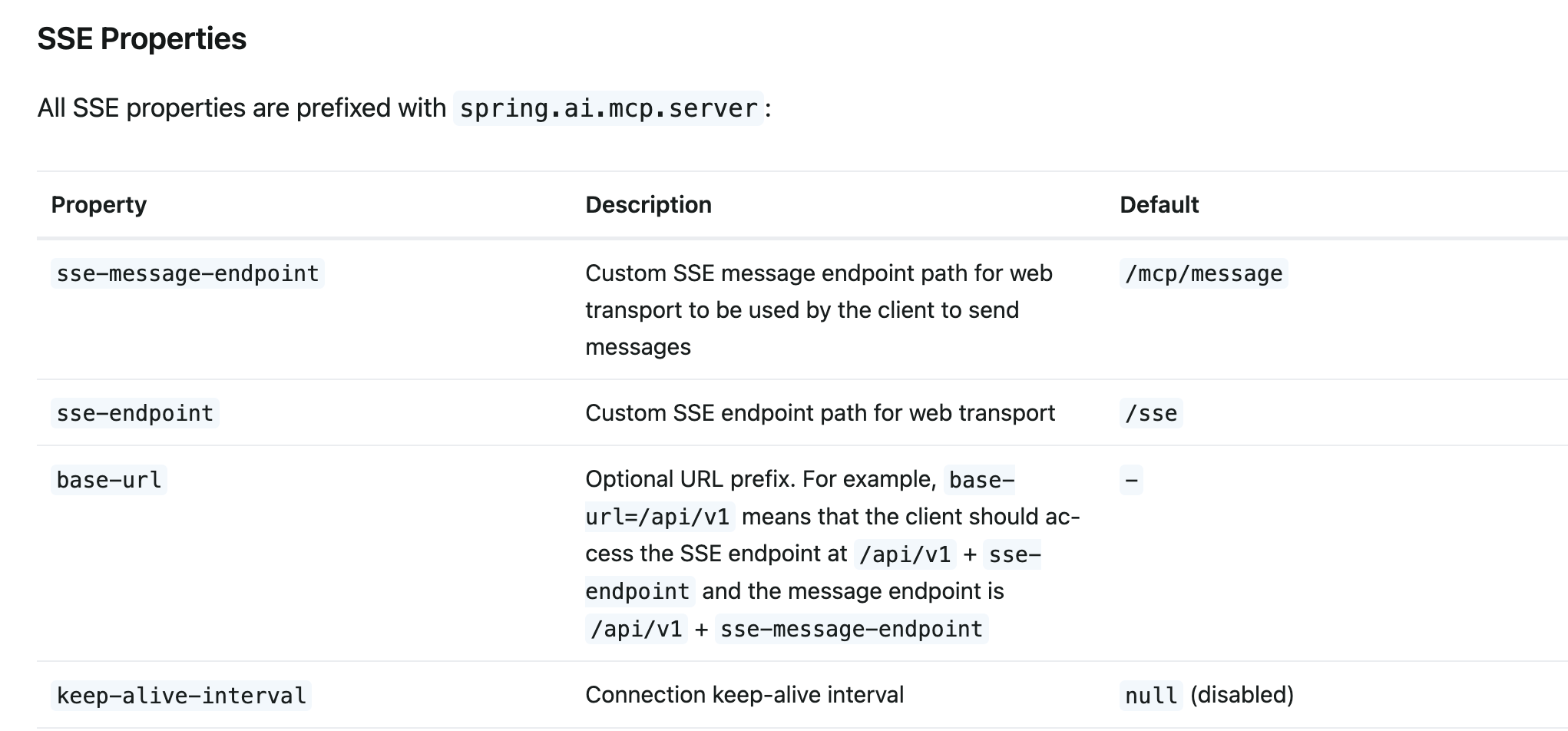
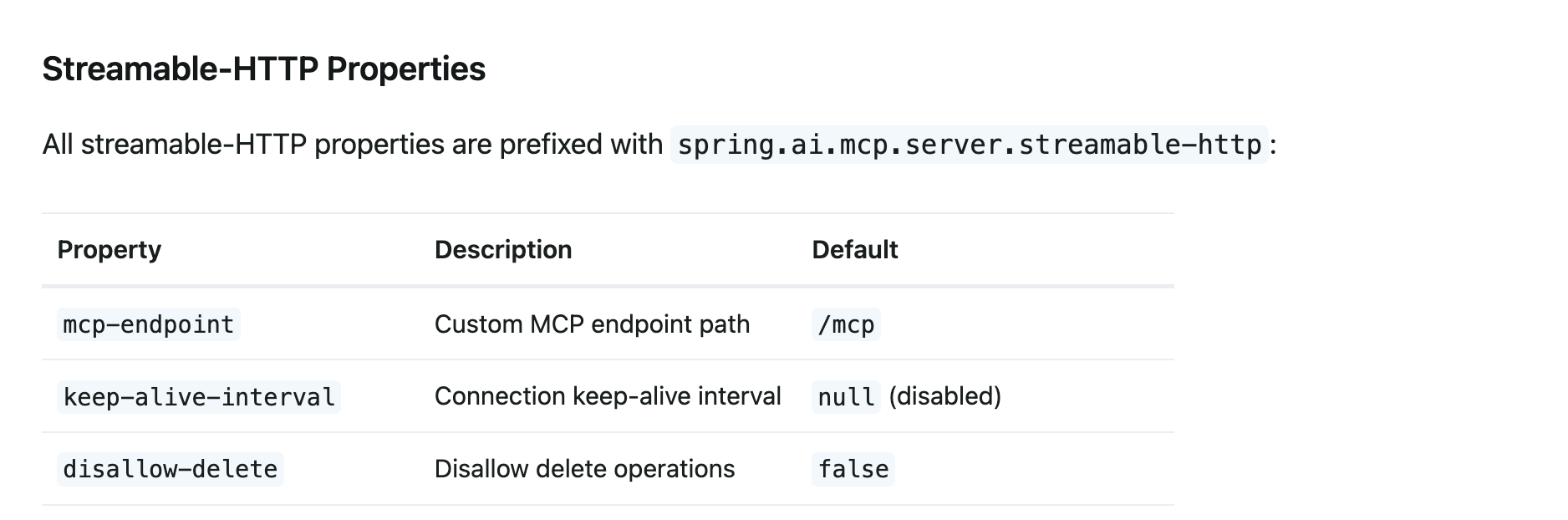
配置参数
spring.ai.mcp.server
| 参数 | 描述 | 默认值 |
|---|---|---|
| enabled | 是否启用 | true |
| stdio | 是否启用stdio | False |
| name | server名称 | mcp-server |
| version | 版本 | 1.0.0 |
| instructions | 可选说明 | null |
| type | Server type (SYNC/ASYNC) | SYNC |
| capabilities.resource | 能否让模型访问/理解外部资源 | true |
| capabilities.tool | 能否调用注册的工具 / 函数 | true |
| capabilities.prompt | 能否使用结构化 Prompt / PromptTemplate | true |
| capabilities.completion | 能否进行“纯补全文本”模式 | true |
| resource-change-notification | Stateless 不适用 | true |
| prompt-change-notification | Stateless 不适用 | true |
| tool-change-notification | Stateless 不适用 | true |
| tool-response-mime-type | 响应mime , example image/png | - |
| annotation-scanner.enabled | True | |
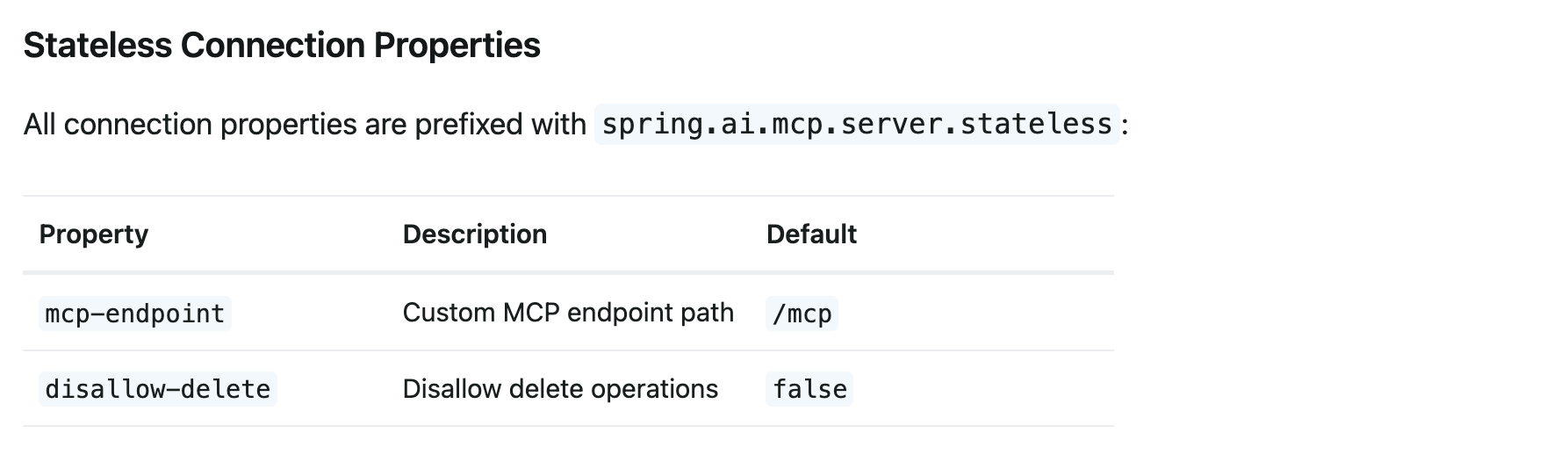
Server Starter Tools
非注解
@Bean
public ToolCallbackProvider myTools(...) {
    List<ToolCallback> tools = ...
    return ToolCallbackProvider.from(tools);
}

// or using the low-level API:

@Bean
public List<McpServerFeatures.SyncToolSpecification> myTools(...) {
    List<McpServerFeatures.SyncToolSpecification> tools = ...
    return tools;
}
注解
@Component
public class CalculatorTools {

    @McpTool(name = "add", description = "Add two numbers together")
    public int add(
            @McpToolParam(description = "First number", required = true) int a,
            @McpToolParam(description = "Second number", required = true) int b) {
        return a + b;
    }
}

@McpTool(name = "calculate-area",
         description = "Calculate the area of a rectangle",
         annotations = McpTool.McpAnnotations(
             title = "Rectangle Area Calculator",
             readOnlyHint = true,
             destructiveHint = false,
             idempotentHint = true
         ))
public AreaResult calculateRectangleArea(
        @McpToolParam(description = "Width", required = true) double width,
        @McpToolParam(description = "Height", required = true) double height) {

    return new AreaResult(width * height, "square units");
}

// context 参数注入
@McpTool(name = "process-data", description = "Process data with request context")
public String processData(
        McpSyncRequestContext context,
        @McpToolParam(description = "Data to process", required = true) String data) {

    // 返回给客户端的info日志
    // Send logging notification
    context.info("Processing data: " + data);

    // Send progress notification (using convenient method)
    context.progress(p -> p.progress(0.5).total(1.0).message("Processing..."));

    // Ping the client
    context.ping();

    return "Processed: " + data.toUpperCase();
}

// 动态参数
@McpTool(name = "flexible-tool", description = "Process dynamic schema")
public CallToolResult processDynamic(CallToolRequest request) {
    Map<String, Object> args = request.arguments();

    // Process based on runtime schema
    String result = "Processed " + args.size() + " arguments dynamically";

    return CallToolResult.builder()
        .addTextContent(result)
        .build();
}

// 有进度反馈
@McpTool(name = "long-task", description = "Long-running task with progress")
public String performLongTask(
        McpSyncRequestContext context,
        @McpToolParam(description = "Task name", required = true) String taskName) {

    // Access progress token from context
    String progressToken = context.request().progressToken();

    if (progressToken != null) {
      	// 处理进度
        context.progress(p -> p.progress(0.0).total(1.0).message("Starting task"));

        // Perform work...

        context.progress(p -> p.progress(1.0).total(1.0).message("Task completed"));
    }

    return "Task " + taskName + " completed";
}
Server Starter Resource
非注解
@Bean
public List<McpServerFeatures.SyncResourceSpecification> myResources(...) {
    var systemInfoResource = new McpSchema.Resource(...);
    var resourceSpecification = new McpServerFeatures.SyncResourceSpecification(systemInfoResource, (exchange, request) -> {
        try {
            var systemInfo = Map.of(...);
            String jsonContent = new ObjectMapper().writeValueAsString(systemInfo);
            return new McpSchema.ReadResourceResult(
                    List.of(new McpSchema.TextResourceContents(request.uri(), "application/json", jsonContent)));
        }
        catch (Exception e) {
            throw new RuntimeException("Failed to generate system info", e);
        }
    });

    return List.of(resourceSpecification);
}
注解
@Component
public class ResourceProvider {

    @McpResource(
        uri = "config://{key}",
        name = "Configuration",
        description = "Provides configuration data")
    public String getConfig(String key) {
        return configData.get(key);
    }
}

// 返回对象是ReadResourceResult
@McpResource(
    uri = "user-profile://{username}",
    name = "User Profile",
    description = "Provides user profile information")
public ReadResourceResult getUserProfile(String username) {
    String profileData = loadUserProfile(username);

    return new ReadResourceResult(List.of(
        new TextResourceContents(
            "user-profile://" + username,
            "application/json",
            profileData)
    ));
}


// context参数注入
@McpResource(
    uri = "data://{id}",
    name = "Data Resource",
    description = "Resource with request context")
public ReadResourceResult getData(
        McpSyncRequestContext context,
        String id) {

    // Send logging notification using convenient method
    context.info("Accessing resource: " + id);

    // Ping the client
    context.ping();

    String data = fetchData(id);

    return new ReadResourceResult(List.of(
        new TextResourceContents("data://" + id, "text/plain", data)
    ));
}
Server Starter Prompts
非注解
@Bean
public List<McpServerFeatures.SyncPromptSpecification> myPrompts() {
    var prompt = new McpSchema.Prompt("greeting", "A friendly greeting prompt",
        List.of(new McpSchema.PromptArgument("name", "The name to greet", true)));

    var promptSpecification = new McpServerFeatures.SyncPromptSpecification(prompt, (exchange, getPromptRequest) -> {
        String nameArgument = (String) getPromptRequest.arguments().get("name");
        if (nameArgument == null) { nameArgument = "friend"; }
        var userMessage = new PromptMessage(Role.USER, new TextContent("Hello " + nameArgument + "! How can I assist you today?"));
        return new GetPromptResult("A personalized greeting message", List.of(userMessage));
    });

    return List.of(promptSpecification);
}
注解
@Component
public class PromptProvider {

    @McpPrompt(
        name = "greeting",
        description = "Generate a greeting message")
    public GetPromptResult greeting(
            @McpArg(name = "name", description = "User's name", required = true)
            String name) {

        String message = "Hello, " + name + "! How can I help you today?";

        return new GetPromptResult(
            "Greeting",
            List.of(new PromptMessage(Role.ASSISTANT, new TextContent(message)))
        );
    }
}


@McpPrompt(
    name = "personalized-message",
    description = "Generate a personalized message")
public GetPromptResult personalizedMessage(
        @McpArg(name = "name", required = true) String name,
        @McpArg(name = "age", required = false) Integer age,
        @McpArg(name = "interests", required = false) String interests) {

    StringBuilder message = new StringBuilder();
    message.append("Hello, ").append(name).append("!\n\n");

    if (age != null) {
        message.append("At ").append(age).append(" years old, ");
        // Add age-specific content
    }

    if (interests != null && !interests.isEmpty()) {
        message.append("Your interest in ").append(interests);
        // Add interest-specific content
    }

    return new GetPromptResult(
        "Personalized Message",
        List.of(new PromptMessage(Role.ASSISTANT, new TextContent(message.toString())))
    );
}
Server Starter Completion
非注解
@Bean
public List<McpServerFeatures.SyncCompletionSpecification> myCompletions() {
    var completion = new McpServerFeatures.SyncCompletionSpecification(
        new McpSchema.PromptReference(
					"ref/prompt", "code-completion", "Provides code completion suggestions"),
        (exchange, request) -> {
            // Implementation that returns completion suggestions
            return new McpSchema.CompleteResult(List.of("python", "pytorch", "pyside"), 10, true);
        }
    );

    return List.of(completion);
}
注解
@Component
public class CompletionProvider {

    @McpComplete(prompt = "city-search")
    public List<String> completeCityName(String prefix) {
        return cities.stream()
            .filter(city -> city.toLowerCase().startsWith(prefix.toLowerCase()))
            .limit(10)
            .toList();
    }
}

//CompleteRequest.CompleteArgument
@McpComplete(prompt = "travel-planner")
public List<String> completeTravelDestination(CompleteRequest.CompleteArgument argument) {
    String prefix = argument.value().toLowerCase();
    String argumentName = argument.name();

    // Different completions based on argument name
    if ("city".equals(argumentName)) {
        return completeCities(prefix);
    } else if ("country".equals(argumentName)) {
        return completeCountries(prefix);
    }

    return List.of();
}

//CompleteResult
@McpComplete(prompt = "code-completion")
public CompleteResult completeCode(String prefix) {
    List<String> completions = generateCodeCompletions(prefix);

    return new CompleteResult(
        new CompleteResult.CompleteCompletion(
            completions,
            completions.size(),  // total
            hasMoreCompletions   // hasMore flag
        )
    );
}
Demo
stdio
# Using spring-ai-starter-mcp-server
spring:
  ai:
    mcp:
      server:
        name: stdio-mcp-server
        version: 1.0.0
        type: SYNC
webmvc
# Using spring-ai-starter-mcp-server-webmvc
spring:
  ai:
    mcp:
      server:
        name: webmvc-mcp-server
        version: 1.0.0
        type: SYNC
        instructions: "This server provides weather information tools and resources"
        sse-message-endpoint: /mcp/messages
        capabilities:
          tool: true
          resource: true
          prompt: true
          completion: true
webflux
# Using spring-ai-starter-mcp-server-webflux
spring:
  ai:
    mcp:
      server:
        name: webflux-mcp-server
        version: 1.0.0
        type: ASYNC  # Recommended for reactive applications
        instructions: "This reactive server provides weather information tools and resources"
        sse-message-endpoint: /mcp/messages
        capabilities:
          tool: true
          resource: true
          prompt: true
          completion: true
server
@Service
public class WeatherService {

    @Tool(description = "Get weather information by city name")
    public String getWeather(String cityName) {
        // Implementation
    }
}

@SpringBootApplication
public class McpServerApplication {

    private static final Logger logger = LoggerFactory.getLogger(McpServerApplication.class);

    public static void main(String[] args) {
        SpringApplication.run(McpServerApplication.class, args);
    }

	@Bean
	public ToolCallbackProvider weatherTools(WeatherService weatherService) {
		return MethodToolCallbackProvider.builder().toolObjects(weatherService).build();
	}
}